# Configuration du module

Après l'installation du module Advanced CRM, il est impératif de créer un fichier de configuration.  
Ce fichier permet de pouvoir activer les différents connecteurs OpenDataSoft, Pappers et CreditSafe. On y renseignera URL, comptes ou encore clé d'API.  
  
Initialisation :  
Dans un premier temps, il faut ajouter une date et sélectionner la configuration comme étant "Active".  
  
Le choix des fonctionnalité est à faire en fonction du besoin, tout cocher garantit un fonctionnement normal.

# Configuration OpenDataSoft

#### OpenDataSoft

En cochant la case "API ODS active", le contenu de l'onglet OpenDataSoft se préremplit. Il n'est pas nécessaire de modifier les champs remplis automatiquement.

[![ODSCONFIG.png](https://docs.myfab.fr/uploads/images/gallery/2024-07/scaled-1680-/odsconfig.png)](https://docs.myfab.fr/uploads/images/gallery/2024-07/odsconfig.png)
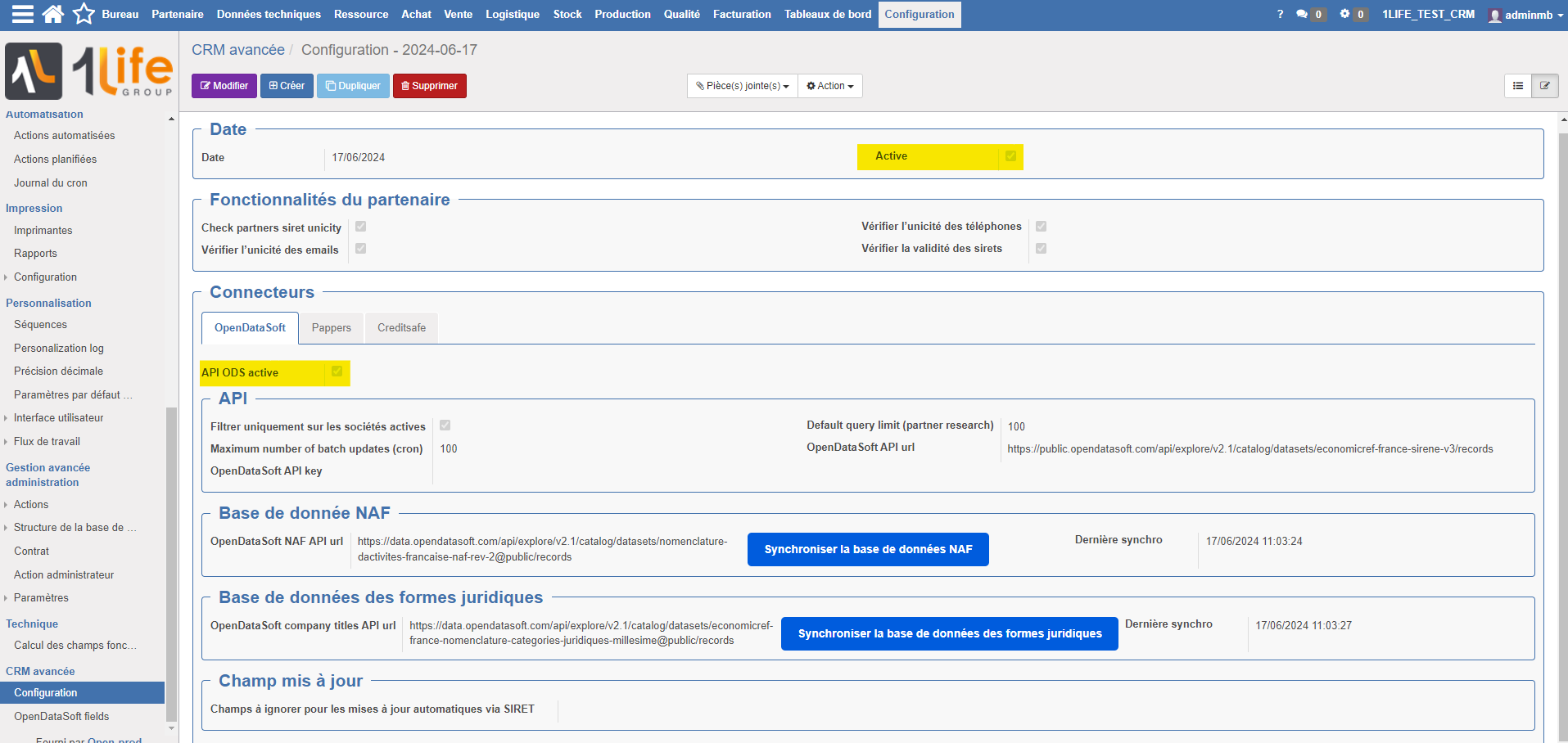
Voilà le contenu de chaque champ :

<table border="0" cellpadding="0" cellspacing="0" class="oe_form_group" id="bkmrk-default-query-limit-" style="width: 100%;"><tbody><tr class="oe_form_group_row"><td class="oe_form_group_cell oe_form_group_cell_label" style="width: 32.6252%;" width="1%">**<label aria-describedby="tooltip910236" class=" oe_form_label_help oe_align_right " data-original-title="" for="oe-field-input-512" title="">Default query limit (partner research)</label>**</td><td style="width: 67.3748%;">100</td></tr><tr><td class="oe_form_group_cell oe_form_group_cell_label" style="width: 32.6252%;" width="1%">**<label class=" oe_form_label_help oe_align_right " data-original-title="" for="oe-field-input-514" title="">OpenDataSoft API url</label>**</td><td style="width: 67.3748%;">https://public.opendatasoft.com/api/explore/v2.1/catalog/datasets/economicref-france-sirene-v3/records</td></tr><tr><td class="oe_form_group_cell oe_form_group_cell_label" style="width: 32.6252%;" width="1%">**<label class=" oe_form_label_help oe_align_right " data-original-title="" for="oe-field-input-513" title="">Maximum number of batch updates (cron)</label>**</td><td style="width: 67.3748%;">100</td></tr><tr><td class="oe_form_group_cell oe_form_group_cell_label" style="width: 32.6252%;" width="1%">**<label class=" oe_form_label_help oe_align_right " data-original-title="" for="oe-field-input-515" title="">OpenDataSoft API key</label>**</td><td style="width: 67.3748%;">  
</td></tr><tr><td class="oe_form_group_cell oe_form_group_cell_label" style="width: 32.6252%;" width="1%">**<label class=" oe_form_label_help oe_align_right " data-original-title="" for="oe-field-input-516" title="">OpenDataSoft NAF API url</label>**</td><td style="width: 67.3748%;">https://data.opendatasoft.com/api/explore/v2.1/catalog/datasets/nomenclature-dactivites-francaise-naf-rev-2@public/records</td></tr><tr><td class="oe_form_group_cell oe_form_group_cell_label" style="width: 32.6252%;" width="1%">**<label class=" oe_form_label_help oe_align_right " data-original-title="" for="oe-field-input-518" title="">OpenDataSoft company titles API url</label>**</td><td style="width: 67.3748%;">https://data.opendatasoft.com/api/explore/v2.1/catalog/datasets/economicref-france-nomenclature-categories-juridiques-millesime/records</td></tr></tbody></table>

Une synchronisation des bases de données est recommandée à la création d'un fichier de configuration, un simple clic sur les 2 boutons suivants :

[![BDDNAFCT.png](https://docs.myfab.fr/uploads/images/gallery/2024-07/scaled-1680-/bddnafct.png)](https://docs.myfab.fr/uploads/images/gallery/2024-07/bddnafct.png)

# Configuration CreditSafe

#### CreditSafe

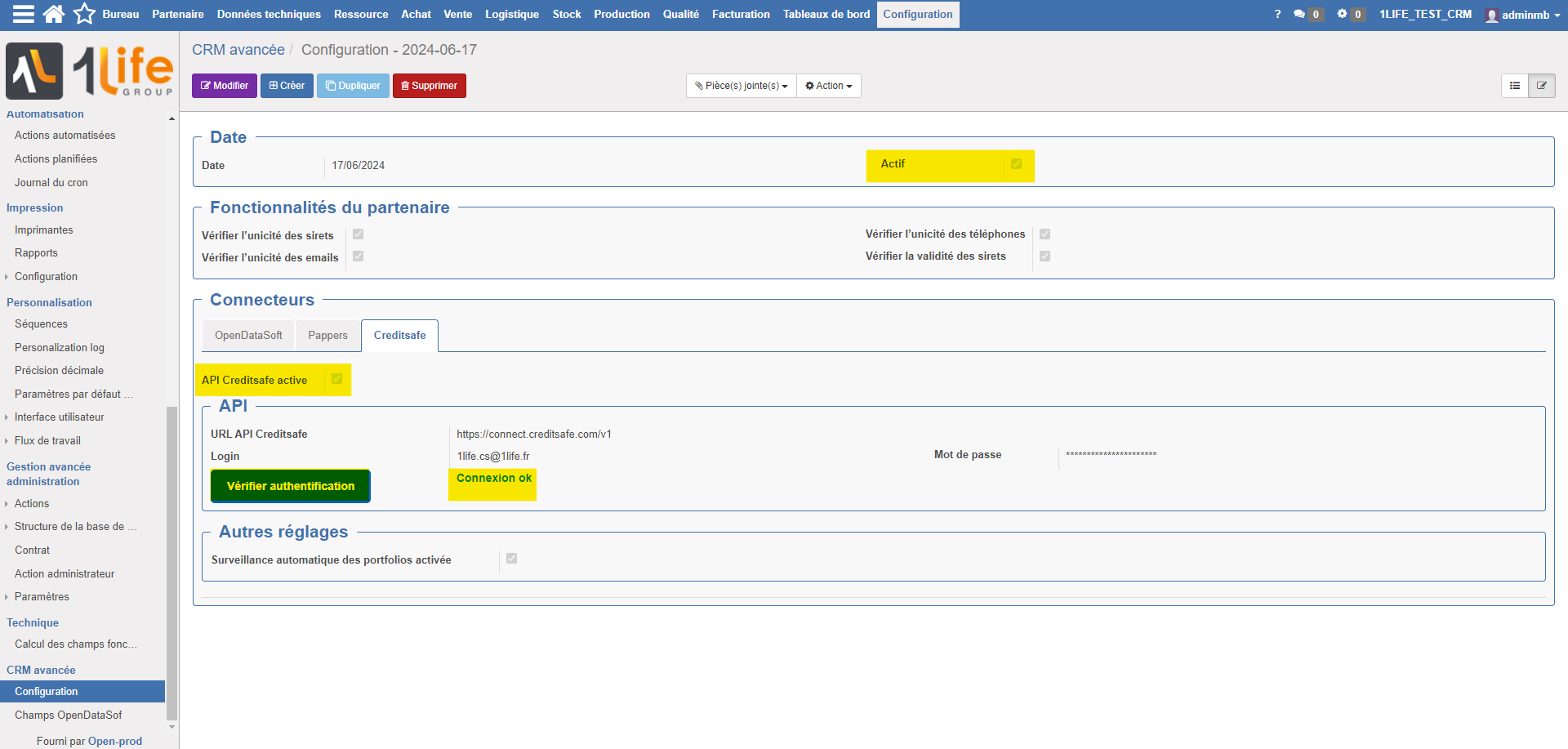
En cochant la case "API CreditSafe active", le contenu de l'onglet CreditSafe se préremplit. Il n'est pas nécessaire de modifier le champ remplis automatiquement.

Voilà le contenu de chaque champ :

<table border="1" id="bkmrk-creditsafe-api-url-h" style="border-collapse: collapse; width: 100%; height: 95.6407px;"><colgroup><col style="width: 30.6551%;"></col><col style="width: 69.3449%;"></col></colgroup><tbody><tr style="height: 36.0469px;"><td class="oe_form_group_cell oe_form_group_cell_label" style="height: 36.0469px;" width="1%"><label aria-describedby="tooltip687218" class=" oe_form_label_help oe_align_right " data-original-title="" for="oe-field-input-525" title="">Creditsafe API url</label></td><td class="oe_form_group_cell" style="height: 36.0469px;" width="95%"><span class="oe_form_field oe_form_field_char mf.advancedcrm.config__creditsafe_api_url"><span class="oe_form_char_content">https://connect.creditsafe.com/v1</span></span></td></tr><tr style="height: 29.7969px;"><td style="height: 29.7969px;">Login</td><td style="height: 29.7969px;">Le nom d'utilisateur et le mot de passe sont transmis par le DSI.</td></tr><tr style="height: 29.7969px;"><td style="height: 29.7969px;">Mot de Passe</td><td style="height: 29.7969px;">Le nom d'utilisateur et le mot de passe sont transmis par le DSI.</td></tr></tbody></table>

[![CSCONFIG.png](https://docs.myfab.fr/uploads/images/gallery/2024-07/scaled-1680-/csconfig.png)](https://docs.myfab.fr/uploads/images/gallery/2024-07/csconfig.png)

# Configuration Pappers

#### Pappers

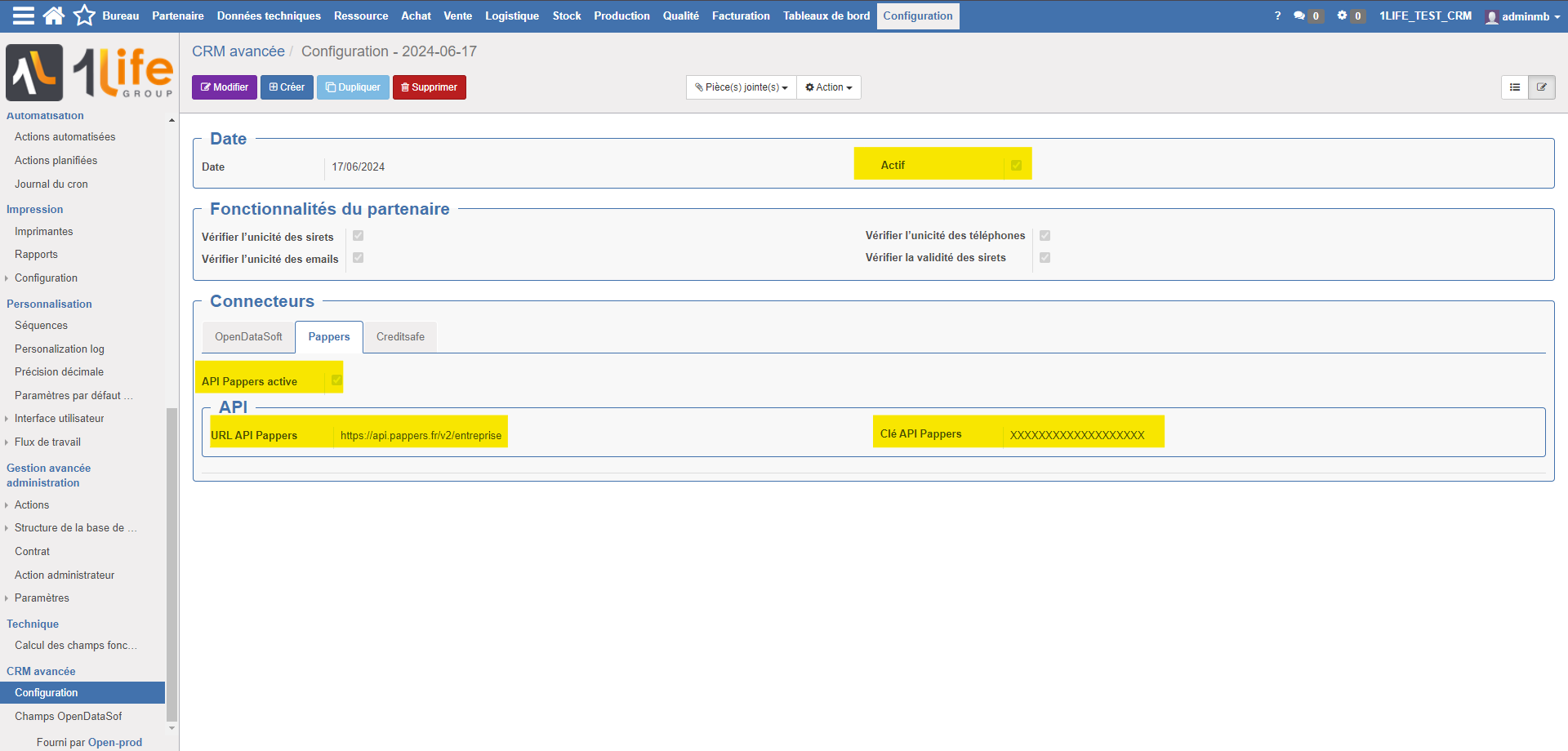
En cochant la case "API Pappers active", le contenu de l'onglet Pappers se préremplit. Il n'est pas nécessaire de modifier le champ remplis automatiquement.

Voilà le contenu de chaque champ :

<table border="0" cellpadding="0" cellspacing="0" class="oe_form_group" id="bkmrk-pappers-api-url-http" style="width: 100%;"><tbody><tr class="oe_form_group_row"><td class="oe_form_group_cell oe_form_group_cell_label" style="width: 15.204%;" width="1%"><label class=" oe_form_label_help oe_align_right " data-original-title="" for="oe-field-input-522" title="">Pappers API url</label></td><td style="width: 84.796%;">https://api.pappers.fr/v2/entreprise</td></tr><tr><td class="oe_form_group_cell oe_form_group_cell_label" style="width: 15.204%;" width="1%"><label class=" oe_form_label_help oe_align_right " data-original-title="" for="oe-field-input-25" title="">Clé API Pappers</label></td><td style="width: 84.796%;">La clé d'API Pappers est transmise par le DSI.</td></tr></tbody></table>

<div class="pointer-container" id="bkmrk-%C2%A0-0"><div class="pointer anim is-page-editable"><svg class="svg-icon" data-icon="link" role="presentation" viewbox="0 0 24 24" xmlns="http://www.w3.org/2000/svg"></svg><div class="input-group inline block"> <button class="button outline icon" data-clipboard-target="#pointer-url" title="Copier le lien" type="button"><svg class="svg-icon" data-icon="copy" role="presentation" viewbox="0 0 24 24" xmlns="http://www.w3.org/2000/svg"></svg></button></div><svg class="svg-icon" data-icon="edit" role="presentation" viewbox="0 0 24 24" xmlns="http://www.w3.org/2000/svg"></svg></div></div>[![PAPPERSCONFIG.png](https://docs.myfab.fr/uploads/images/gallery/2024-07/scaled-1680-/pappersconfig.png)](https://docs.myfab.fr/uploads/images/gallery/2024-07/pappersconfig.png)

# Configuration SociétéInfo

#### SociétéInfo

En cochant la case "API Societeinfo active", le contenu de l'onglet Societeinfo se préremplit.

Voilà le contenu de chaque champ :

<table border="0" cellpadding="0" cellspacing="0" class="oe_form_group" id="bkmrk-pappers-api-url-http" style="width: 100%;"><tbody><tr class="oe_form_group_row"><td class="oe_form_group_cell oe_form_group_cell_label" style="width: 31.701%;" width="1%"><label class=" oe_form_label_help oe_align_right " data-original-title="" for="oe-field-input-522" title="">Societeinfo API url</label></td><td class="oe_form_group_cell" style="width: 66.9773%;" width="49%"><span class="oe_form_field oe_form_field_char mf.advancedcrm.config__societeinfo_api_url"><span class="oe_form_char_content">https://societeinfo.com/app/rest/api/v2</span></span></td><td class="oe_form_group_cell oe_form_group_cell_label" style="width: 1.31094%;" width="1%"> </td></tr><tr><td class="oe_form_group_cell oe_form_group_cell_label" style="width: 31.701%;" width="1%"><label class=" oe_form_label_help oe_align_right " data-original-title="" for="oe-field-input-25" title="">Clé API Societeinfo</label></td><td style="width: 66.9773%;">La clé d'API Societeinfo est transmise par le DSI.</td><td style="width: 1.31094%;">  
</td></tr></tbody></table>

[![image.png](https://docs.myfab.fr/uploads/images/gallery/2025-07/scaled-1680-/5rQimage.png)](https://docs.myfab.fr/uploads/images/gallery/2025-07/5rQimage.png)