# Initialisation

#### 1. Pré-requis

Avant d'installer myFAB Fondation ou tout autre module myfab, **[il convient de s'assurer que les sources ont été déployées sur le serveur](https://docs.myfab.fr/books/myfab-file-interface-mffi/page/sources-myfab)**.

Puisqu'il s'agit de conditionner une base de données, il est également impératif qu'une base de données ait été créée via la méthode « Create Database » du Gestionnaire de bases de données d'Open-Prod.

#### 2. Installation myFAB Fondation

L'installation du module s'effectue depuis l'onglet Configuration &gt; Application d'Open-Prod. Dans la barre de recherche, taper "my\_fab". Le module myFAB Fondation sera présent si les sources myFAB ont bien été déployées. Cliquer sur "Activer" puis suivre les différentes étapes du déploiement directement dans la page Open-Prod.

[![image.png](https://docs.myfab.fr/uploads/images/gallery/2026-03/scaled-1680-/O8uimage.png)](https://docs.myfab.fr/uploads/images/gallery/2026-03/O8uimage.png)

**Au lancement de la première installation, le module va directement lancer l'installation du module Comptabilité.**

A mi parcours, la wizard suivante va vous demander de configurer vos options comptables (comme si vous installiez le module Comptabilité directement) :

[![image.png](https://docs.myfab.fr/uploads/images/gallery/2025-09/scaled-1680-/adEimage.png)](https://docs.myfab.fr/uploads/images/gallery/2025-09/adEimage.png)

[![image.png](https://docs.myfab.fr/uploads/images/gallery/2025-09/scaled-1680-/1Q5image.png)](https://docs.myfab.fr/uploads/images/gallery/2025-09/1Q5image.png)

<p class="callout danger">**L'installation de ce module peut être longue. Il ne faut pas interrompre le traitement tant que le chargement n'est pas terminé.**</p>

Après installation de la Comptabilité, le wizard suivant va s'afficher :

[![image.png](https://docs.myfab.fr/uploads/images/gallery/2025-09/scaled-1680-/u11image.png)](https://docs.myfab.fr/uploads/images/gallery/2025-09/u11image.png)
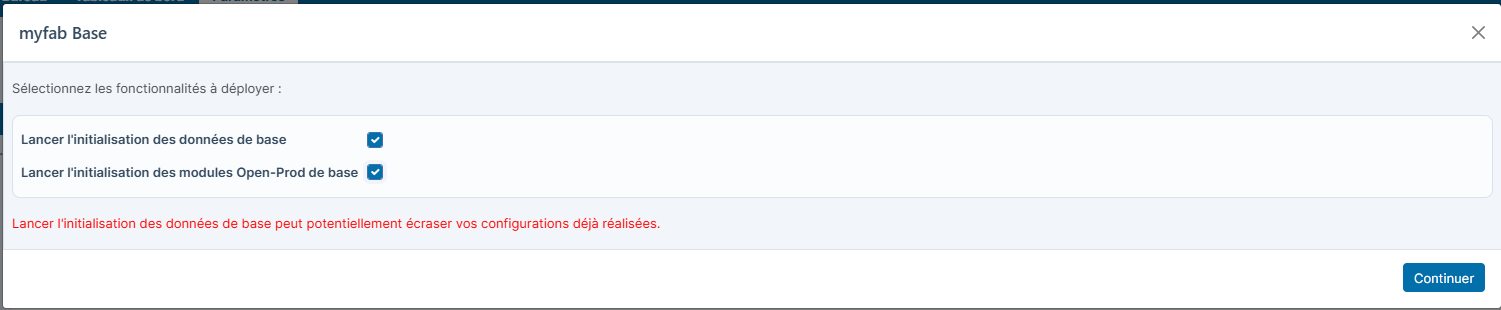
**Installé dans tous les cas :**

- <span style="font-size: 10.0pt; font-family: 'Helvetica',sans-serif; mso-fareast-font-family: 'Times New Roman'; color: #4c4c4c; mso-font-kerning: 0pt; mso-ligatures: none; mso-fareast-language: FR;">Une liste d'import Excel de base (Contact, Adresse, Client, Fournisseur, Catégories de produits, Plan comptable, Référencement client, Référencement fournisseur, Nomenclature, Lignes de nomenclature, Gamme, Produits, Commandes de vente, Etats commandes de vente, Commandes d'achat): un modèle d'import Excel est maintenant disponible directement dans les modèles d'import.</span>

**Lancer l'initialisation des données de base va ajouter les éléments suivants :**

- Intinitialisation via code python : 
    - Droits sur le profil administrateur
    - Génération des lignes de calendrier
- Initialisation par fichier de donnée json <table style="width: 110.052%; height: 1109.78px;"><thead><tr style="height: 29.7875px;"><th style="width: 33.2817%; height: 29.7875px;">Fichier</th><th style="width: 37.4056%; height: 29.7875px;">Description</th><th style="width: 29.2869%; height: 29.7875px;">Commentaire</th></tr></thead><tbody><tr style="height: 46.5875px;"><td style="width: 33.2817%; height: 46.5875px;">00-res\_company.json</td><td style="width: 37.4056%; height: 46.5875px;">Configuration de la société</td><td style="width: 29.2869%; height: 46.5875px;">Emplacement par défaut, Horizon</td></tr><tr style="height: 29.7875px;"><td style="width: 33.2817%; height: 29.7875px;">01-ir\_default.json</td><td style="width: 37.4056%; height: 29.7875px;">Valeurs par défaut</td><td style="width: 29.2869%; height: 29.7875px;">Valeurs par défaut partenaire, </td></tr><tr style="height: 29.7875px;"><td style="width: 33.2817%; height: 29.7875px;">02-ir\_sequence.json</td><td style="width: 37.4056%; height: 29.7875px;">Séquences</td><td style="width: 29.2869%; height: 29.7875px;">séquences UC, lot, UM </td></tr><tr style="height: 46.4px;"><td style="width: 33.2817%; height: 46.4px;">03-stock\_label\_template.json</td><td style="width: 37.4056%; height: 46.4px;">Modèles d’étiquettes de stock</td><td style="width: 29.2869%; height: 46.4px;">modèles UC, UM avec rapport qweb standard</td></tr><tr style="height: 29.7875px;"><td style="width: 33.2817%; height: 29.7875px;">04-stock\_lot\_template.json</td><td style="width: 37.4056%; height: 29.7875px;">Modèles de lots</td><td style="width: 29.2869%; height: 29.7875px;">avec rapport qweb standard</td></tr><tr style="height: 29.7875px;"><td style="width: 33.2817%; height: 29.7875px;">05-product\_category.json</td><td style="width: 37.4056%; height: 29.7875px;">Catégories de produits</td><td style="width: 29.2869%; height: 29.7875px;">Exemples de catégories de produit</td></tr><tr style="height: 29.7875px;"><td style="width: 33.2817%; height: 29.7875px;">08-resource\_pause.json</td><td style="width: 37.4056%; height: 29.7875px;">Gestion des pauses</td><td style="width: 29.2869%; height: 29.7875px;">Pause obligatoire</td></tr><tr style="height: 29.7875px;"><td style="width: 33.2817%; height: 29.7875px;">09-resource\_config\_settings.json</td><td style="width: 37.4056%; height: 29.7875px;">Paramètres de Ressources</td><td style="width: 29.2869%; height: 29.7875px;">  
    </td></tr><tr style="height: 29.7875px;"><td style="width: 33.2817%; height: 29.7875px;">10-purchase\_config\_settings.json</td><td style="width: 37.4056%; height: 29.7875px;">Paramètres des achats</td><td style="width: 29.2869%; height: 29.7875px;">  
    </td></tr><tr style="height: 46.4px;"><td style="width: 33.2817%; height: 46.4px;">11-sale\_config\_settings\_openprod.json</td><td style="width: 37.4056%; height: 46.4px;">Paramètres des ventes (Open-prod)</td><td style="width: 29.2869%; height: 46.4px;">  
    </td></tr><tr style="height: 29.7875px;"><td style="width: 33.2817%; height: 29.7875px;">12-stock\_config\_settings.json</td><td style="width: 37.4056%; height: 29.7875px;">Paramètres du stock</td><td style="width: 29.2869%; height: 29.7875px;">  
    </td></tr><tr style="height: 29.7875px;"><td style="width: 33.2817%; height: 29.7875px;">13-sale\_validity\_period.json</td><td style="width: 37.4056%; height: 29.7875px;">Période de validité des ventes</td><td style="width: 29.2869%; height: 29.7875px;">30 jours</td></tr><tr style="height: 63.3875px;"><td style="width: 33.2817%; height: 63.3875px;">14-nonconformity\_file\_config\_settings.json</td><td style="width: 37.4056%; height: 63.3875px;">Paramètres des fichiers de non-conformité</td><td style="width: 29.2869%; height: 63.3875px;">  
    </td></tr><tr style="height: 29.7875px;"><td style="width: 33.2817%; height: 29.7875px;">15-payment\_method.json</td><td style="width: 37.4056%; height: 29.7875px;">Méthodes de paiement</td><td style="width: 29.2869%; height: 29.7875px;">exemples de méthodes de paiement</td></tr><tr style="height: 46.4px;"><td style="width: 33.2817%; height: 46.4px;">16-technical\_data\_config\_settings.json</td><td style="width: 37.4056%; height: 46.4px;">Paramètres des données techniques</td><td style="width: 29.2869%; height: 46.4px;">  
    </td></tr><tr style="height: 46.4px;"><td style="width: 33.2817%; height: 46.4px;">17-account\_config\_settings.json</td><td style="width: 37.4056%; height: 46.4px;">Paramètres de la comptabilité</td><td style="width: 29.2869%; height: 46.4px;">Paramètres compta de base notamment pour la gestion des acomptes</td></tr><tr style="height: 29.7875px;"><td style="width: 33.2817%; height: 29.7875px;">18-account\_journal.json</td><td style="width: 37.4056%; height: 29.7875px;">Journaux comptables</td><td style="width: 29.2869%; height: 29.7875px;">journaux d'acomptes</td></tr><tr style="height: 29.7875px;"><td style="width: 33.2817%; height: 29.7875px;">19-product\_product.json</td><td style="width: 37.4056%; height: 29.7875px;">Produits</td><td style="width: 29.2869%; height: 29.7875px;">Produit acompte</td></tr><tr style="height: 29.7875px;"><td style="width: 33.2817%; height: 29.7875px;">20-stock\_alert\_color.json</td><td style="width: 37.4056%; height: 29.7875px;">Couleurs d’alerte de stock</td><td style="width: 29.2869%; height: 29.7875px;">  
    </td></tr><tr style="height: 29.7875px;"><td style="width: 33.2817%; height: 29.7875px;">21-stock\_warehouse.json</td><td style="width: 37.4056%; height: 29.7875px;">Entrepôts</td><td style="width: 29.2869%; height: 29.7875px;">méthode d'appro par défaut des entrepôt</td></tr><tr style="height: 46.4px;"><td style="width: 33.2817%; height: 46.4px;">22-account\_invoicing\_method.json</td><td style="width: 37.4056%; height: 46.4px;">Méthodes de facturation</td><td style="width: 29.2869%; height: 46.4px;">méthodes de facturation par défaut avec et sans acompte</td></tr><tr style="height: 29.7875px;"><td style="width: 33.2817%; height: 29.7875px;">23-qweb\_report.json</td><td style="width: 37.4056%; height: 29.7875px;">Publication de tous rapports qweb</td><td style="width: 29.2869%; height: 29.7875px;">  
    </td></tr><tr style="height: 63.2px;"><td style="width: 33.2817%; height: 63.2px;">24-mail\_template.json</td><td style="width: 37.4056%; height: 63.2px;">Ajout des Rapports qweb comme pièce jointe dans les modèles de mails standards</td><td style="width: 29.2869%; height: 63.2px;">  
    </td></tr><tr style="height: 80px;"><td style="width: 33.2817%; height: 80px;">25-printers\_server.json</td><td style="width: 37.4056%; height: 80px;">Ajout serveur cups de base (localhost:631) + ajout des imprimantes installées + application type A4 si nécesaire</td><td style="width: 29.2869%; height: 80px;">  
    </td></tr><tr style="height: 29.6px;"><td style="width: 33.2817%; height: 29.6px;">26-printers\_report.json</td><td style="width: 37.4056%; height: 29.6px;">afféctation des rapports qweb aux impréssions standard (pour impression direct (exemple impression BL via imprimante reseau)</td><td style="width: 29.2869%; height: 29.6px;">  
    </td></tr><tr style="height: 29.6px;"><td style="width: 33.2817%; height: 29.6px;">27-export\_security\_rule.json</td><td style="width: 37.4056%; height: 29.6px;">Création règle de sécurité des exports (produit, partner ... pour l'admin)</td><td style="width: 29.2869%; height: 29.6px;">  
    </td></tr><tr style="height: 29.6px;"><td style="width: 33.2817%; height: 29.6px;">28-stock\_location.json</td><td style="width: 37.4056%; height: 29.6px;">traduction des emplacements de l'entrepôt Warehouse et ajout code barres sur emplacement physiques</td><td style="width: 29.2869%; height: 29.6px;">  
    </td></tr><tr style="height: 29.6px;"><td style="width: 33.2817%; height: 29.6px;">29-ir\_actions\_server.json</td><td style="width: 37.4056%; height: 29.6px;">Ajout action et activation action serveur pour activer les nomenclatures et gammes en masses. </td><td style="width: 29.2869%; height: 29.6px;">  
    </td></tr></tbody></table>

**Lancer l'initialisation des modules Open-Prod de base** va lancer l'installation de modules essentiels pour une configuration standard d'Open-Prod.

- - ### Comptabilité
        
        <div class="_tableContainer_1rjym_1"><div class="group _tableWrapper_1rjym_13 flex w-fit flex-col-reverse" tabindex="-1"><table class="w-fit min-w-(--thread-content-width)" data-end="637" data-start="214"><thead data-end="251" data-start="214"><tr data-end="251" data-start="214"><th data-col-size="sm" data-end="237" data-start="214">Nom technique</th><th data-col-size="md" data-end="251" data-start="237">Nom commun</th></tr></thead><tbody data-end="637" data-start="290"><tr data-end="362" data-start="290"><td data-col-size="sm" data-end="314" data-start="290">account\_openprod</td><td data-col-size="md" data-end="362" data-start="314">Base - Comptabilité &amp; Facturation &amp; Paiement</td></tr><tr data-end="415" data-start="363"><td data-col-size="sm" data-end="387" data-start="363">account\_chart</td><td data-col-size="md" data-end="415" data-start="387">Modèle de plan comptable</td></tr><tr data-end="466" data-start="416"><td data-col-size="sm" data-end="440" data-start="416">base\_iban</td><td data-col-size="md" data-end="466" data-start="440">Comptes bancaires IBAN</td></tr><tr data-end="522" data-start="467"><td data-col-size="sm" data-end="491" data-start="467">base\_vat</td><td data-col-size="md" data-end="522" data-start="491">Validation du numéro de TVA</td></tr><tr data-end="572" data-start="523"><td data-col-size="sm" data-end="547" data-start="523">l10n\_fr</td><td data-col-size="md" data-end="572" data-start="547">France - Comptabilité</td></tr><tr data-end="637" data-start="573"><td data-col-size="sm" data-end="597" data-start="573">data\_account\_report</td><td data-col-size="md" data-end="637" data-start="597">Données pour les rapports comptables</td></tr></tbody></table>
        
        </div></div>---
        
        ### Impressions &amp; Rapports
        
        <div class="_tableContainer_1rjym_1"><div class="group _tableWrapper_1rjym_13 flex w-fit flex-col-reverse" tabindex="-1"><table class="w-fit min-w-(--thread-content-width)" data-end="1502" data-start="671"><thead data-end="710" data-start="671"><tr data-end="710" data-start="671"><th data-col-size="sm" data-end="696" data-start="671">Nom technique</th><th data-col-size="md" data-end="710" data-start="696">Nom commun</th></tr></thead><tbody data-end="1502" data-start="751"><tr data-end="796" data-start="751"><td data-col-size="sm" data-end="777" data-start="751">base\_printers</td><td data-col-size="md" data-end="796" data-start="777">Impressions 1/2</td></tr><tr data-end="842" data-start="797"><td data-col-size="sm" data-end="823" data-start="797">printers</td><td data-col-size="md" data-end="842" data-start="823">Impressions 2/2</td></tr><tr data-end="904" data-start="843"><td data-col-size="sm" data-end="869" data-start="843">printers\_mrp</td><td data-col-size="md" data-end="904" data-start="869">Impressions pour la fabrication</td></tr><tr data-end="965" data-start="905"><td data-col-size="sm" data-end="931" data-start="905">printers\_stock</td><td data-col-size="md" data-end="965" data-start="931">Impressions pour la logistique</td></tr><tr data-end="1028" data-start="966"><td data-col-size="sm" data-end="992" data-start="966">printers\_res\_partner</td><td data-col-size="md" data-end="1028" data-start="992">Impressions pour les partenaires</td></tr><tr data-end="1090" data-start="1029"><td data-col-size="sm" data-end="1055" data-start="1029">printers\_resource</td><td data-col-size="md" data-end="1090" data-start="1055">Impressions pour les ressources</td></tr><tr data-end="1146" data-start="1091"><td data-col-size="sm" data-end="1117" data-start="1091">data\_base\_qweb\_report</td><td data-col-size="md" data-end="1146" data-start="1117">Données des rapports Qweb</td></tr><tr data-end="1210" data-start="1147"><td data-col-size="sm" data-end="1173" data-start="1147">data\_base\_report</td><td data-col-size="md" data-end="1210" data-start="1173">Données pour les rapports de base</td></tr><tr data-end="1272" data-start="1211"><td data-col-size="sm" data-end="1237" data-start="1211">jasper\_server</td><td data-col-size="md" data-end="1272" data-start="1237">Interfaçage JasperReport Server</td></tr><tr data-end="1315" data-start="1273"><td data-col-size="sm" data-end="1299" data-start="1273">excel\_import</td><td data-col-size="md" data-end="1315" data-start="1299">Import Excel</td></tr><tr data-end="1359" data-start="1316"><td data-col-size="sm" data-end="1342" data-start="1316">excel\_report</td><td data-col-size="md" data-end="1359" data-start="1342">Rapport excel</td></tr><tr data-end="1433" data-start="1360"><td data-col-size="sm" data-end="1386" data-start="1360">web\_multi\_select</td><td data-col-size="md" data-end="1433" data-start="1386">Recherche multiple dans une vue liste (Web)</td></tr><tr data-end="1502" data-start="1434"><td data-col-size="sm" data-end="1460" data-start="1434">edi\_openprod</td><td data-col-size="md" data-end="1502" data-start="1460">EDI (Échange de Données Informatisées)</td></tr></tbody></table>
        
        </div></div>---
        
        ### Base &amp; Outils
        
        <div class="_tableContainer_1rjym_1"><div class="group _tableWrapper_1rjym_13 flex w-fit flex-col-reverse" tabindex="-1"><table class="w-fit min-w-(--thread-content-width)" data-end="2325" data-start="1527"><thead data-end="1572" data-start="1527"><tr data-end="1572" data-start="1527"><th data-col-size="sm" data-end="1558" data-start="1527">Nom technique</th><th data-col-size="sm" data-end="1572" data-start="1558">Nom commun</th></tr></thead><tbody data-end="2325" data-start="1620"><tr data-end="1681" data-start="1620"><td data-col-size="sm" data-end="1652" data-start="1620">product</td><td data-col-size="sm" data-end="1681" data-start="1652">Produits &amp; Listes de prix</td></tr><tr data-end="1728" data-start="1682"><td data-col-size="sm" data-end="1714" data-start="1682">mail</td><td data-col-size="sm" data-end="1728" data-start="1714">Discussion</td></tr><tr data-end="1776" data-start="1729"><td data-col-size="sm" data-end="1761" data-start="1729">partner\_openprod</td><td data-col-size="sm" data-end="1776" data-start="1761">Partenaires</td></tr><tr data-end="1833" data-start="1777"><td data-col-size="sm" data-end="1809" data-start="1777">delivery\_address</td><td data-col-size="sm" data-end="1833" data-start="1809">Adresse de livraison</td></tr><tr data-end="1880" data-start="1834"><td data-col-size="sm" data-end="1866" data-start="1834">translator</td><td data-col-size="sm" data-end="1880" data-start="1866">Traducteur</td></tr><tr data-end="1936" data-start="1881"><td data-col-size="sm" data-end="1913" data-start="1881">base\_import</td><td data-col-size="sm" data-end="1936" data-start="1913">Importation de base</td></tr><tr data-end="2000" data-start="1937"><td data-col-size="sm" data-end="1969" data-start="1937">compute\_stored\_fields</td><td data-col-size="sm" data-end="2000" data-start="1969">Calculer les champs stockés</td></tr><tr data-end="2063" data-start="2001"><td data-col-size="sm" data-end="2033" data-start="2001">enterprise\_social\_network</td><td data-col-size="sm" data-end="2063" data-start="2033">Réseau social d'entreprise</td></tr><tr data-end="2116" data-start="2064"><td data-col-size="sm" data-end="2096" data-start="2064">mass\_editing</td><td data-col-size="sm" data-end="2116" data-start="2096">Édition de masse</td></tr><tr data-end="2164" data-start="2117"><td data-col-size="sm" data-end="2149" data-start="2117">myfab\_tools</td><td data-col-size="sm" data-end="2164" data-start="2149">myfab tools</td></tr><tr data-end="2221" data-start="2165"><td data-col-size="sm" data-end="2197" data-start="2165">myfab\_file\_interface</td><td data-col-size="sm" data-end="2221" data-start="2197">myfab File Interface</td></tr><tr data-end="2268" data-start="2222"><td data-col-size="sm" data-end="2254" data-start="2222">calendar</td><td data-col-size="sm" data-end="2268" data-start="2254">Calendrier</td></tr><tr data-end="2325" data-start="2269"><td data-col-size="sm" data-end="2301" data-start="2269">maintenance\_contract</td><td data-col-size="sm" data-end="2325" data-start="2301">Gestion des contrats</td></tr></tbody></table>
        
        </div></div>---
        
        ### Ventes &amp; Stock
        
        <div class="_tableContainer_1rjym_1"><div class="group _tableWrapper_1rjym_13 flex w-fit flex-col-reverse" tabindex="-1"><table class="w-fit min-w-(--thread-content-width)" data-end="2691" data-start="2351"><thead data-end="2385" data-start="2351"><tr data-end="2385" data-start="2351"><th data-col-size="sm" data-end="2371" data-start="2351">Nom technique</th><th data-col-size="sm" data-end="2385" data-start="2371">Nom commun</th></tr></thead><tbody data-end="2691" data-start="2421"><tr data-end="2451" data-start="2421"><td data-col-size="sm" data-end="2441" data-start="2421">sale</td><td data-col-size="sm" data-end="2451" data-start="2441">Ventes</td></tr><tr data-end="2482" data-start="2452"><td data-col-size="sm" data-end="2472" data-start="2452">purchase</td><td data-col-size="sm" data-end="2482" data-start="2472">Achats</td></tr><tr data-end="2543" data-start="2483"><td data-col-size="sm" data-end="2503" data-start="2483">warning</td><td data-col-size="sm" data-end="2543" data-start="2503">Gestion des alertes (Achat et vente)</td></tr><tr data-end="2578" data-start="2544"><td data-col-size="sm" data-end="2564" data-start="2544">stock</td><td data-col-size="sm" data-end="2578" data-start="2564">Inventaire</td></tr><tr data-end="2624" data-start="2579"><td data-col-size="sm" data-end="2599" data-start="2579">stock\_location</td><td data-col-size="sm" data-end="2624" data-start="2599">Emplacements de stock</td></tr><tr data-end="2660" data-start="2625"><td data-col-size="sm" data-end="2645" data-start="2625">mrp</td><td data-col-size="sm" data-end="2660" data-start="2645">Fabrication</td></tr><tr data-end="2691" data-start="2661"><td data-col-size="sm" data-end="2681" data-start="2661">charge</td><td data-col-size="sm" data-end="2691" data-start="2681">Charge</td></tr></tbody></table>
        
        </div></div>---
        
        ### Web &amp; Workflow
        
        <div class="_tableContainer_1rjym_1"><div class="group _tableWrapper_1rjym_13 flex w-fit flex-col-reverse" tabindex="-1"><table class="w-fit min-w-(--thread-content-width)" data-end="3213" data-start="2717"><thead data-end="2757" data-start="2717"><tr data-end="2757" data-start="2717"><th data-col-size="sm" data-end="2743" data-start="2717">Nom technique</th><th data-col-size="sm" data-end="2757" data-start="2743">Nom commun</th></tr></thead><tbody data-end="3213" data-start="2799"><tr data-end="2855" data-start="2799"><td data-col-size="sm" data-end="2825" data-start="2799">web\_data\_base\_name</td><td data-col-size="sm" data-end="2855" data-start="2825">Afficher le nom de la base</td></tr><tr data-end="2909" data-start="2856"><td data-col-size="sm" data-end="2882" data-start="2856">web\_mail\_autocomplete</td><td data-col-size="sm" data-end="2909" data-start="2882">Web autocomplétion mail</td></tr><tr data-end="2959" data-start="2910"><td data-col-size="sm" data-end="2936" data-start="2910">web\_modify\_view</td><td data-col-size="sm" data-end="2959" data-start="2936">Modification de vue</td></tr><tr data-end="3024" data-start="2960"><td data-col-size="sm" data-end="2986" data-start="2960">web\_view\_field\_list</td><td data-col-size="sm" data-end="3024" data-start="2986">Modification rapide des vues liste</td></tr><tr data-end="3079" data-start="3025"><td data-col-size="sm" data-end="3051" data-start="3025">web\_export\_view</td><td data-col-size="sm" data-end="3079" data-start="3051">Exporter la vue courante</td></tr><tr data-end="3144" data-start="3080"><td data-col-size="sm" data-end="3106" data-start="3080">workflow\_initialization</td><td data-col-size="sm" data-end="3144" data-start="3106">Initialisation des flux de travail</td></tr></tbody></table>
        
        </div></div>

#### 3. Mise à jour et maintenance

Le wizard d'initialisation se déclenche automatiquement lors de la première installation du module. Il est possible de le relancer manuellement si par exemple vous avez oublié de cocher les cases. Pour cela allez dans paramètres&gt;Technique&gt;Actions&gt;Assistant de configuration

Il suffit de filtrer les lignes sur le statut "A faire" puis "'Lancer". Cependant, attention il y a des risques d'importer les données en doublons...

[![image.png](https://docs.myfab.fr/uploads/images/gallery/2026-03/scaled-1680-/qUXimage.png)](https://docs.myfab.fr/uploads/images/gallery/2026-03/qUXimage.png)