# myFAB Qualité avancée

Le Module myFAB Qualité avancée permet d'apporter des améliorations aux fonctionnalités qualité standard Open-Prod.

# Amélioration déclaration de contrôle qualité

# Gestion des moyens de contrôle

### <span style="mso-fareast-font-family: 'Calibri Light'; mso-fareast-theme-font: major-latin; mso-bidi-font-family: 'Calibri Light'; mso-bidi-theme-font: major-latin; mso-fareast-language: FR;"><span style="mso-list: Ignore;">1.<span style="font: 7.0pt 'Times New Roman';"> </span></span></span><span style="mso-fareast-language: FR;">Prérequis </span>

<span style="mso-fareast-language: FR;">Avoir installé le module « GMAO»</span>

<span style="mso-fareast-language: FR;">Activer le module 'myFAB Qualité avancée' dans **Paramètre &gt; Applications principales.**</span>

[![image.png](https://docs.myfab.fr/uploads/images/gallery/2026-04/scaled-1680-/6WIimage.png)](https://docs.myfab.fr/uploads/images/gallery/2026-04/6WIimage.png)

<p class="callout info"><span style="mso-fareast-language: FR;">Cette fonctionnalité est devenue standard dans Apenprod à partir de la v10.1, donc notre surcouche myFAB à été supprimée pour utiliser le </span><span style="mso-fareast-language: FR;">standard</span></p>

### <span style="mso-fareast-font-family: 'Calibri Light'; mso-fareast-theme-font: major-latin; mso-bidi-font-family: 'Calibri Light'; mso-bidi-theme-font: major-latin; mso-fareast-language: FR;"><span style="mso-list: Ignore;">2.<span style="font: 7.0pt 'Times New Roman';"> </span></span></span><span style="mso-fareast-language: FR;">Résumé</span>

Ajouter la possibilité de déclarer les moyens de contrôle lorsqu’on saisit un contrôle qualité, quel que soit le type de contrôle (en production, post-production, en réception, post-réception, manuel).

### <span style="mso-fareast-font-family: 'Calibri Light'; mso-fareast-theme-font: major-latin; mso-bidi-font-family: 'Calibri Light'; mso-bidi-theme-font: major-latin; mso-fareast-language: FR;"><span style="mso-list: Ignore;">3.<span style="font: 7.0pt 'Times New Roman';"> </span></span></span><span style="mso-fareast-language: FR;">Utilisation</span>

<span style="font-family: Wingdings; mso-fareast-font-family: Wingdings; mso-bidi-font-family: Wingdings;"><span style="mso-list: Ignore;">Ø<span style="font: 7.0pt 'Times New Roman';"> </span></span></span>Définir vos catégories de moyens de contrôles dans ***Qualité &gt; Moyens de contrôle &gt; Catégories de moyens de contrôles***.

[![image.png](https://docs.myfab.fr/uploads/images/gallery/2026-04/scaled-1680-/8IIimage.png)](https://docs.myfab.fr/uploads/images/gallery/2026-04/8IIimage.png)

<span style="mso-no-proof: yes;"> </span>

<span style="font-family: Wingdings; mso-fareast-font-family: Wingdings; mso-bidi-font-family: Wingdings;"><span style="mso-list: Ignore;">Ø<span style="font: 7.0pt 'Times New Roman';"> </span></span></span>Créer vos moyens de contrôles ***Qualité&gt; Moyens de contrôle&gt;Moyens de contrôles*** et affecter chaque moyen de contrôle à une catégorie de contrôle.

[![image.png](https://docs.myfab.fr/uploads/images/gallery/2026-03/scaled-1680-/2gwimage.png)](https://docs.myfab.fr/uploads/images/gallery/2026-03/2gwimage.png)

<span style="mso-no-proof: yes;"> </span>

<p class="callout success"><span style="font-family: Symbol; mso-fareast-font-family: Symbol; mso-bidi-font-family: Symbol;"><span style="mso-list: Ignore;"><span style="font: 7.0pt 'Times New Roman';"> </span></span></span>Le modèle des moyens de contrôle s’appuie sur celui des équipements GMAO. Ainsi, les fonctionnalités de la GMAO vous permettront gérer correctement le suivi de vos moyens de contrôles (documents, étalonnages, intervention préventives et curatives…) de la même façon que vous gérées vos équipements GMAO.</p>

<p class="callout success"> A partir de la v10.1 l'objet "park" utilisé pour les équipements GMAO est remplacé sur l'objet "gmao.equipment"</p>

<p class="callout success"> Une séquence automatique a été ajoutée sur les équipements pour permettre de numéroter les moyens de contrôles</p>

<span style="font-family: Wingdings; mso-fareast-font-family: Wingdings; mso-bidi-font-family: Wingdings;"><span style="mso-list: Ignore;">Ø<span style="font: 7.0pt 'Times New Roman';"> </span></span></span>Depuis un contrôle qualité vous avez une nouvelle option :

<span style="font-family: 'Courier New'; mso-fareast-font-family: 'Courier New';"><span style="mso-list: Ignore;">o<span style="font: 7.0pt 'Times New Roman';"> </span></span></span>« Familles de contrôle qualité » : sélectionner la (ou les) famille(s) du moyen de contrôle du moyen de contrôle attendu. L’opérateur devra forcément choisir un moyen de contrôle « en activité » appartenant à cette (ces) famille(s)

<span style="mso-no-proof: yes;"> </span>

[![image.png](https://docs.myfab.fr/uploads/images/gallery/2026-03/scaled-1680-/Fhnimage.png)](https://docs.myfab.fr/uploads/images/gallery/2026-03/Fhnimage.png)

<span style="font-family: Wingdings; mso-fareast-font-family: Wingdings; mso-bidi-font-family: Wingdings;"><span style="mso-list: Ignore;">Ø<span style="font: 7.0pt 'Times New Roman';"> </span></span></span>Dans la fenêtre de déclaration des contrôles :

<span style="font-family: 'Courier New'; mso-fareast-font-family: 'Courier New';"><span style="mso-list: Ignore;">o<span style="font: 7.0pt 'Times New Roman';"> </span></span></span>Si le type du contrôle à la case cochée « Contrôle qualité obligatoire »

<span style="font-family: Wingdings; mso-fareast-font-family: Wingdings; mso-bidi-font-family: Wingdings;"><span style="mso-list: Ignore;">§<span style="font: 7.0pt 'Times New Roman';"> </span></span></span>Les colonnes Catégorie de contrôle, et moyen de contrôles apparaissent et l’opérateur doit sélectionner un (ou des) moyen(s) de contrôle.

<span style="mso-no-proof: yes;"> </span>

[![image.png](https://docs.myfab.fr/uploads/images/gallery/2026-03/scaled-1680-/pW4image.png)](https://docs.myfab.fr/uploads/images/gallery/2026-03/pW4image.png)

<span style="mso-no-proof: yes;"> </span>

# Gestion des étiquettes par avance

<span style="mso-fareast-language: FR;">Pouvoir associer une étiquette par avance à une ligne de contrôle qualité en production (dans le cas d’un contrôle post-prod ou post réception, l’utilisateur pourra associer directement l’étiquette créée).</span>

#### <span style="mso-fareast-font-family: 'Calibri Light'; mso-fareast-theme-font: major-latin; mso-bidi-font-family: 'Calibri Light'; mso-bidi-theme-font: major-latin; mso-fareast-language: FR;"><span style="mso-list: Ignore;">1.<span style="font: 7.0pt 'Times New Roman';"> </span></span></span><span style="mso-fareast-language: FR;">Utilisation</span>

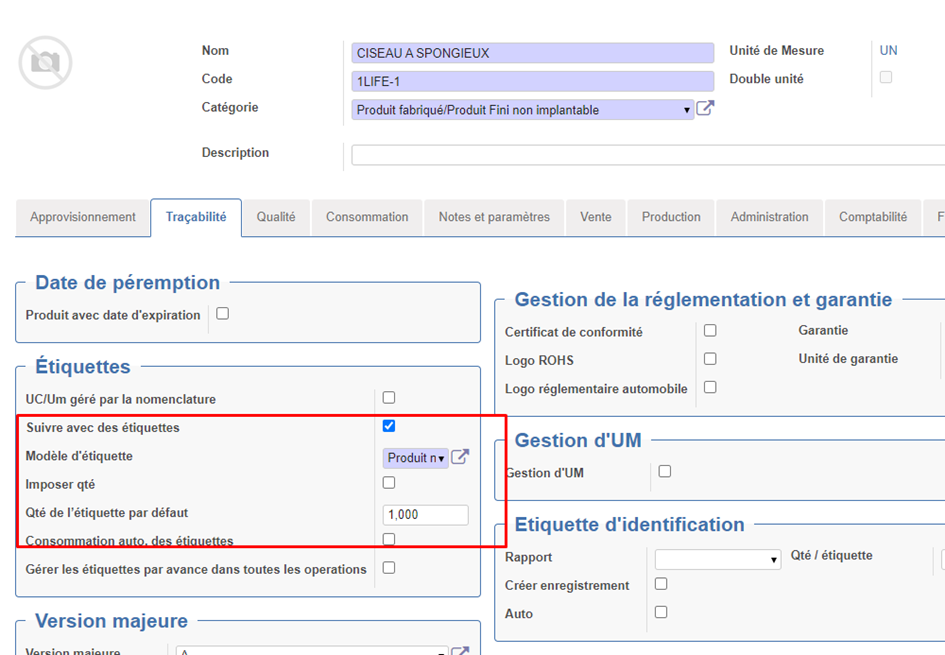
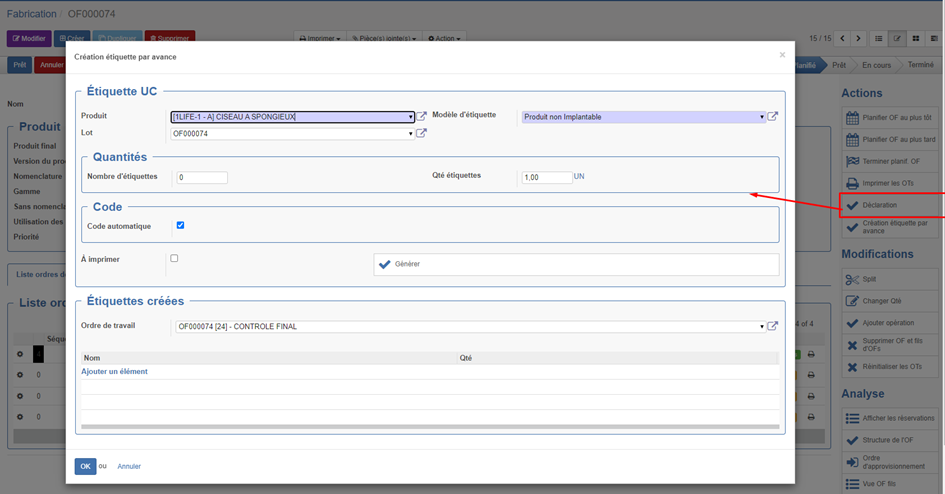
<span style="font-family: Wingdings; mso-fareast-font-family: Wingdings; mso-bidi-font-family: Wingdings;"><span style="mso-list: Ignore;">Ø<span style="font: 7.0pt 'Times New Roman';"> </span></span></span>**<u>Rappel utilisation étiquette par avance :</u>** le module étiquette par avance permet de générer des étiquettes de fabrication avant qu’elles soient produites et entrée en stock.

<span style="font-family: 'Courier New'; mso-fareast-font-family: 'Courier New';"><span style="mso-list: Ignore;">o<span style="font: 7.0pt 'Times New Roman';"> </span></span></span>Paramétrage fiche article : Cocher « Suivre avec des étiquettes » et sélectionner un modèle d’étiquette.
![](https://docs.myfab.fr/uploads/images/gallery/2024-09/embedded-image-nqus4mcb.png)

<span style="mso-no-proof: yes;"> </span>

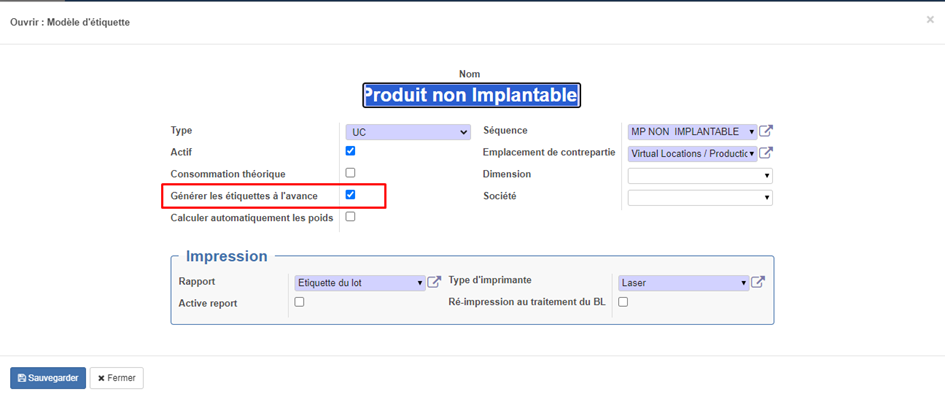
<span style="font-family: 'Courier New'; mso-fareast-font-family: 'Courier New';"><span style="mso-list: Ignore;">o<span style="font: 7.0pt 'Times New Roman';"> </span></span></span>Dans le modèle d’étiquette : Cocher la case<span style="mso-spacerun: yes;"> </span>« Gérer les étiquettes à l’avance »

![](https://docs.myfab.fr/uploads/images/gallery/2024-09/embedded-image-z3n33pgo.png)

<span style="mso-no-proof: yes;"> </span>

<span style="font-family: 'Courier New'; mso-fareast-font-family: 'Courier New';"><span style="mso-list: Ignore;">o<span style="font: 7.0pt 'Times New Roman';"> </span></span></span>Depuis un OF vous pouvez maintenant générer dès le début de l’OF la liste des étiquettes par avance.[![download.png](https://docs.myfab.fr/uploads/images/gallery/2024-09/scaled-1680-/download.png)](https://docs.myfab.fr/uploads/images/gallery/2024-09/download.png)
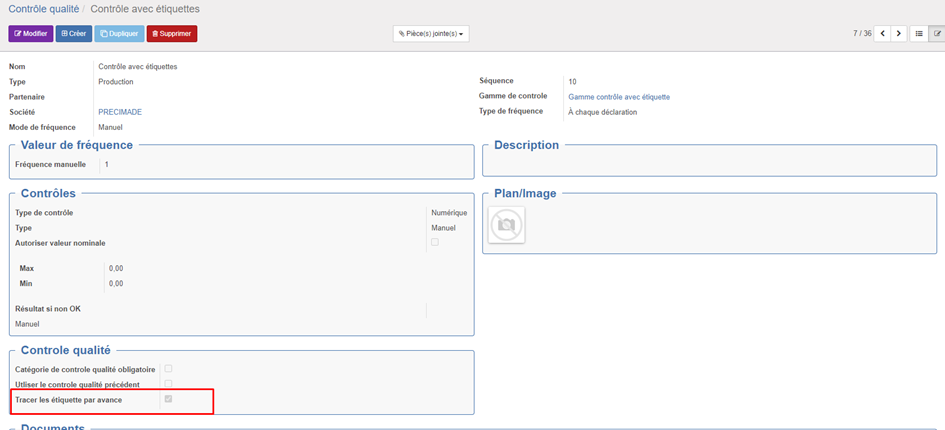
<span style="font-family: Wingdings; mso-fareast-font-family: Wingdings; mso-bidi-font-family: Wingdings;"><span style="mso-list: Ignore;">Ø<span style="font: 7.0pt 'Times New Roman';"> </span></span></span>Depuis la définition d’un contrôle qualité, il est possible de cocher « Tracer les étiquettes par avance » : de cette façon l’opérateur devra sélectionner sur cette ligne de contrôle une étiquette par avance générée.
![](https://docs.myfab.fr/uploads/images/gallery/2024-09/embedded-image-n8gbq99s.png)

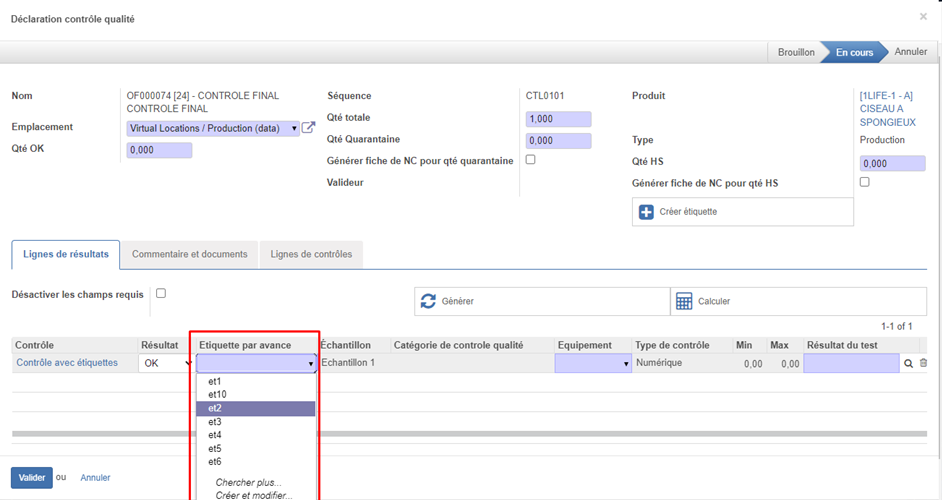
<span style="font-family: Wingdings; mso-fareast-font-family: Wingdings; mso-bidi-font-family: Wingdings;"><span style="mso-list: Ignore;">Ø<span style="font: 7.0pt 'Times New Roman';"> </span></span></span>Lorsque l’opérateur saisi son contrôle qualité, il doit sélectionner une étiquette par avance sur la lignes des contrôles pour les quels on a cocher la case « tracer les étiquettes par avance »
![](https://docs.myfab.fr/uploads/images/gallery/2024-09/embedded-image-l1bjwgot.png)

<span style="mso-no-proof: yes;"> </span>

<span style="font-family: Wingdings; mso-fareast-font-family: Wingdings; mso-bidi-font-family: Wingdings;"><span style="mso-list: Ignore;">Ø<span style="font: 7.0pt 'Times New Roman';"> </span></span></span>Le bouton Créer étiquette permet d’appeler la fonction de création d’étiquette par avance si on ne l’a pas encore fait.

<span style="font-family: Wingdings; mso-fareast-font-family: Wingdings; mso-bidi-font-family: Wingdings;"><span style="mso-list: Ignore;">Ø<span style="font: 7.0pt 'Times New Roman';"> </span></span></span>Depuis l’analyse des lignes de valeurs de contrôles, on peut maintenant consulter l’étiquette qui a été saisie par l’opérateur.

<span style="mso-no-proof: yes;"> </span>

![](https://docs.myfab.fr/uploads/images/gallery/2024-09/embedded-image-3hp7xlo2.png)

<p class="callout warning">**<u>Remarque :</u>** pour l’instant cette amélioration n’est disponible que dans l’interface de saisie classique mais pas depuis les web scanner, ni depuis la déclaration tablette</p>

# Identification opérateur

#### <span style="mso-fareast-font-family: 'Calibri Light'; mso-fareast-theme-font: major-latin; mso-bidi-font-family: 'Calibri Light'; mso-bidi-theme-font: major-latin; mso-fareast-language: FR;"><span style="mso-list: Ignore;">1.<span style="font: 7.0pt 'Times New Roman';"> </span></span></span><span style="mso-fareast-language: FR;">Résumé</span>

<span style="mso-fareast-language: FR;">Ajouter la possibilité d’identifier la ressource qui réalise le contrôle. </span>

#### <span style="mso-fareast-font-family: 'Calibri Light'; mso-fareast-theme-font: major-latin; mso-bidi-font-family: 'Calibri Light'; mso-bidi-theme-font: major-latin; mso-fareast-language: FR;"><span style="mso-list: Ignore;">2.<span style="font: 7.0pt 'Times New Roman';"> </span></span></span><span style="mso-fareast-language: FR;">Utilisation</span>

<span style="font-family: Wingdings; mso-fareast-font-family: Wingdings; mso-bidi-font-family: Wingdings;"><span style="mso-list: Ignore;">Ø<span style="font: 7.0pt 'Times New Roman';"> </span></span></span>Contrôle qualité :

![](https://docs.myfab.fr/uploads/images/gallery/2024-09/embedded-image-937w0dez.png)

<span style="mso-no-proof: yes;"> </span>

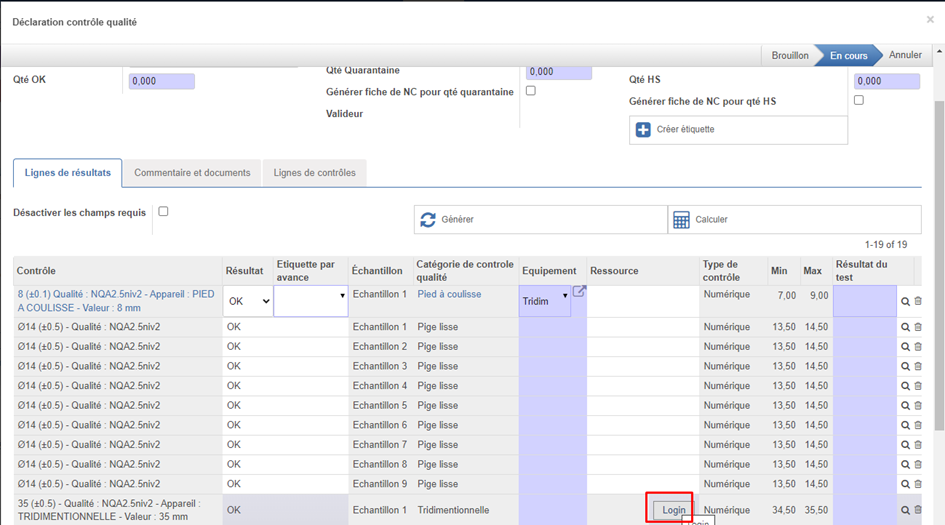
<span style="font-family: 'Courier New'; mso-fareast-font-family: 'Courier New';"><span style="mso-list: Ignore;">o<span style="font: 7.0pt 'Times New Roman';"> </span></span></span>Si la coche « identifier opérateur » est cochée, lors de la saisie d’une ligne de contrôle, l’opérateur devra sélectionner une ressource appartenant à la catégorie de ressource demandée.

<span style="font-family: 'Courier New'; mso-fareast-font-family: 'Courier New';"><span style="mso-list: Ignore;">o<span style="font: 7.0pt 'Times New Roman';"> </span></span></span>Si la coche Authentification opérateur est cochée, la sélection de la ressource ne pourra plus se faire librement mais l’opérateur devra cliquer sur un bouton « Login » pour s’authentifier.
![](https://docs.myfab.fr/uploads/images/gallery/2024-09/embedded-image-oswexqmt.png)

<span style="mso-no-proof: yes;"> </span>

![](https://docs.myfab.fr/uploads/images/gallery/2024-09/embedded-image-hkj90cql.png)

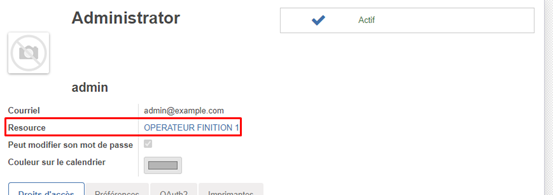
<p class="callout info">Remarque : il est nécessaire d’affecter une ressource à la fiche utilisateur Open-Prod.</p>

![](https://docs.myfab.fr/uploads/images/gallery/2024-09/embedded-image-abtwiblw.png)

<span style="mso-no-proof: yes;"> </span>

<span style="font-family: 'Courier New'; mso-fareast-font-family: 'Courier New';"><span style="mso-list: Ignore;">o<span style="font: 7.0pt 'Times New Roman';"> </span></span></span>Si la case « utiliser la ressource de l’utilisateur » est cochée, la ressource de l’utilisateur sera appliquée automatiquement aux lignes de contrôles à la création du contrôle lorsque c’est possible (si catégorie de ressource cohérente)

<span style="font-family: 'Courier New'; mso-fareast-font-family: 'Courier New';"><span style="mso-list: Ignore;">o<span style="font: 7.0pt 'Times New Roman';"> </span></span></span>Si la case « S’authentifier une seule fois » est cochée, une fois authentifié la ressource de l’utilisateur qui vient de s’authentifié s’appliquera automatiquement à toutes les lignes ou c’est possible pour le contrôle qualité en cours.

<p class="callout warning">**<u>Remarque :</u>** pour l’instant cette amélioration n’est disponible que dans l’interface de saisie classique mais pas depuis les web scanner, ni depuis la déclaration tablette</p>

# Gamme de contrôles

#### <span style="mso-fareast-font-family: 'Calibri Light'; mso-fareast-theme-font: major-latin; mso-bidi-font-family: 'Calibri Light'; mso-bidi-theme-font: major-latin; mso-fareast-language: FR;"><span style="mso-list: Ignore;">1.<span style="font: 7.0pt 'Times New Roman';"> </span></span></span><span style="mso-fareast-language: FR;">Résumé</span>

<span style="mso-fareast-language: FR;">Ajoute la notion de Gamme de contrôle. Une gamme de contrôle permettra de regrouper un ensemble de contrôle qualité ordonné par séquence. Les gammes de contrôles peuvent être appliquées dans les lignes de gammes de fabrication (en lieu et place des contrôles qualité standard Open-Prod). Elles simplifient la saisie des contrôles qualité. </span>

<span style="mso-fareast-language: FR;"> </span>

#### <span style="mso-fareast-font-family: 'Calibri Light'; mso-fareast-theme-font: major-latin; mso-bidi-font-family: 'Calibri Light'; mso-bidi-theme-font: major-latin; mso-fareast-language: FR;"><span style="mso-list: Ignore;">2.<span style="font: 7.0pt 'Times New Roman';"> </span></span></span><span style="mso-fareast-language: FR;">Utilisation</span>

<span style="font-family: Wingdings; mso-fareast-font-family: Wingdings; mso-bidi-font-family: Wingdings;"><span style="mso-list: Ignore;">Ø<span style="font: 7.0pt 'Times New Roman';"> </span></span></span>Enrichissement des « contrôle qualité »

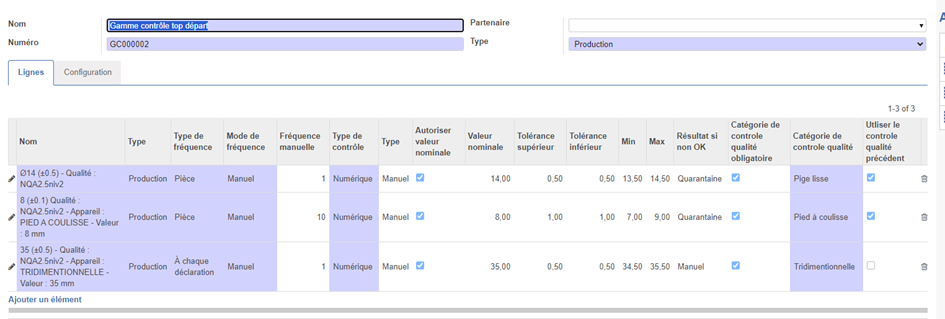
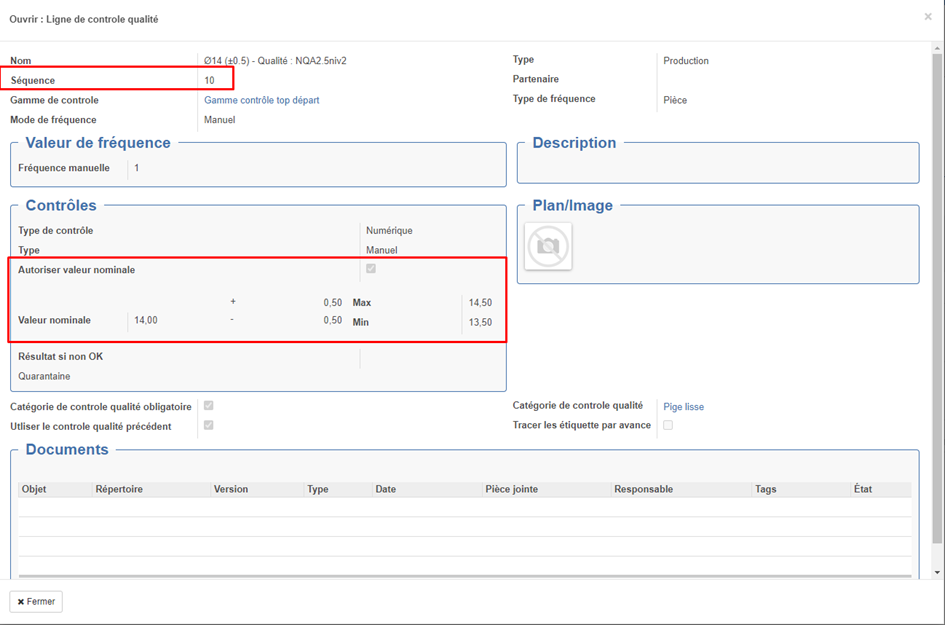
<span style="font-family: 'Courier New'; mso-fareast-font-family: 'Courier New';"><span style="mso-list: Ignore;">o<span style="font: 7.0pt 'Times New Roman';"> </span></span></span>Ajout possibilité de saisir une valeur nominale et une tolérance sup et une tolérance inf en mode numérique / manuelle.

<span style="font-family: 'Courier New'; mso-fareast-font-family: 'Courier New';"><span style="mso-list: Ignore;">o<span style="font: 7.0pt 'Times New Roman';"> </span></span></span>Ajout champ Integer Séquence par défaut (max +10 séquence des autres lignes associée à la même gamme de contrôle)
<span style="mso-no-proof: yes;"> </span>

![](https://docs.myfab.fr/uploads/images/gallery/2024-09/embedded-image-dc2yfbp3.png)

<span style="font-family: Wingdings; mso-fareast-font-family: Wingdings; mso-bidi-font-family: Wingdings;"><span style="mso-list: Ignore;">Ø<span style="font: 7.0pt 'Times New Roman';"> </span></span></span>Création modèle "Gamme de contrôle" avec menu dans Qualité&gt; Gamme de contrôle&gt; gammes de contrôle

![](https://docs.myfab.fr/uploads/images/gallery/2024-09/embedded-image-qvtquwd0.png)![](https://docs.myfab.fr/uploads/images/gallery/2024-09/embedded-image-ddxanibe.png)![](https://docs.myfab.fr/uploads/images/gallery/2024-09/embedded-image-uzy1hfjt.png)

<span style="mso-no-proof: yes;"> </span>

<span style="mso-no-proof: yes;"> </span>

<span style="mso-no-proof: yes;"> </span>

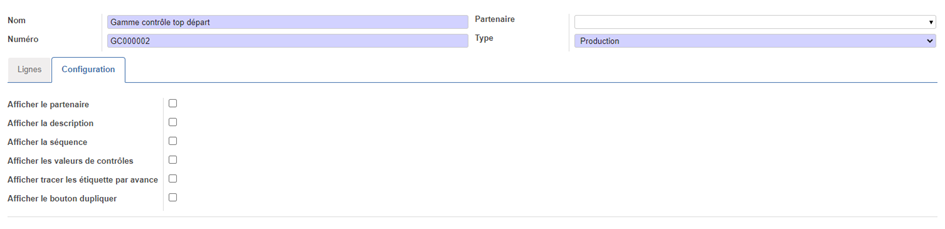
<span style="font-family: 'Courier New'; mso-fareast-font-family: 'Courier New';"><span style="mso-list: Ignore;">o<span style="font: 7.0pt 'Times New Roman';"> </span></span></span>Nom : nom de la gamme

<span style="font-family: 'Courier New'; mso-fareast-font-family: 'Courier New';"><span style="mso-list: Ignore;">o<span style="font: 7.0pt 'Times New Roman';"> </span></span></span>Numéro de gamme : séquence automatique personnalisable dans la liste des séquences

<span style="font-family: 'Courier New'; mso-fareast-font-family: 'Courier New';"><span style="mso-list: Ignore;">o<span style="font: 7.0pt 'Times New Roman';"> </span></span></span>Partenaire : si renseigné il sera utilisé pour renseigner le partenaire de toute nouvelle ligne de gamme créée

<span style="font-family: 'Courier New'; mso-fareast-font-family: 'Courier New';"><span style="mso-list: Ignore;">o<span style="font: 7.0pt 'Times New Roman';"> </span></span></span>Type : si renseigner sera utilisé pour alimenter les nouvelles lignes de gammes que l’on crée.

<span style="font-family: 'Courier New'; mso-fareast-font-family: 'Courier New';"><span style="mso-list: Ignore;">o<span style="font: 7.0pt 'Times New Roman';"> </span></span></span>Lignes de gammes : Liste des lignes de contrôles qualité associées

<span style="font-family: Wingdings; mso-fareast-font-family: Wingdings; mso-bidi-font-family: Wingdings;"><span style="mso-list: Ignore;">§<span style="font: 7.0pt 'Times New Roman';"> </span></span></span>La saisie peut se faire en mode tableau comme dans les nomenclatures ou en mode formulaire en cliquant sur le stylo.

<span style="font-family: Wingdings; mso-fareast-font-family: Wingdings; mso-bidi-font-family: Wingdings;"><span style="mso-list: Ignore;">§<span style="font: 7.0pt 'Times New Roman';"> </span></span></span>L’onglet configuration permet d’ajouter des colonnes

<span style="font-family: Symbol; mso-fareast-font-family: Symbol; mso-bidi-font-family: Symbol;"><span style="mso-list: Ignore;">·<span style="font: 7.0pt 'Times New Roman';"> </span></span></span>Si on met ces valeurs par défaut les colonnes seront affichées lorsqu’on crée un nouvel enregistrement.

<span style="mso-no-proof: yes;"> </span>

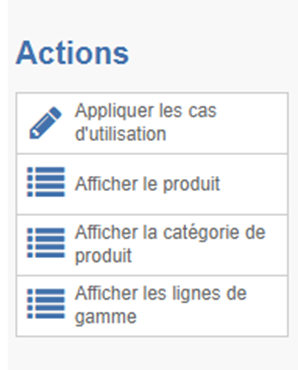
<span style="font-family: Wingdings; mso-fareast-font-family: Wingdings; mso-bidi-font-family: Wingdings;"><span style="mso-list: Ignore;">Ø<span style="font: 7.0pt 'Times New Roman';"> </span></span></span>Les actions :

![](https://docs.myfab.fr/uploads/images/gallery/2024-09/embedded-image-q9em3arw.png)

<span style="font-family: 'Courier New'; mso-fareast-font-family: 'Courier New';"><span style="mso-list: Ignore;">o<span style="font: 7.0pt 'Times New Roman';"> </span></span></span>Appliquer les cas d’utilisation : <span style="mso-spacerun: yes;"> </span>permettant de remettre les lignes de contrôles des produits ou lignes de gammes associées

<span style="font-family: 'Courier New'; mso-fareast-font-family: 'Courier New';"><span style="mso-list: Ignore;">o<span style="font: 7.0pt 'Times New Roman';"> </span></span></span>Afficher le produit : affiche la liste des produits associées

<span style="font-family: 'Courier New'; mso-fareast-font-family: 'Courier New';"><span style="mso-list: Ignore;">o<span style="font: 7.0pt 'Times New Roman';"> </span></span></span>Afficher les lignes de gammes : affiche la liste des lignes de gammes associées

<span style="font-family: 'Courier New'; mso-fareast-font-family: 'Courier New';"><span style="mso-list: Ignore;">o<span style="font: 7.0pt 'Times New Roman';"> </span></span></span>Afficher la catégorie de produit : affiche la liste des catégories de produits associées

<span style="font-family: Wingdings; mso-fareast-font-family: Wingdings; mso-bidi-font-family: Wingdings;"><span style="mso-list: Ignore;">Ø<span style="font: 7.0pt 'Times New Roman';"> </span></span></span>Depuis une ligne de gamme de fabrication, produit :

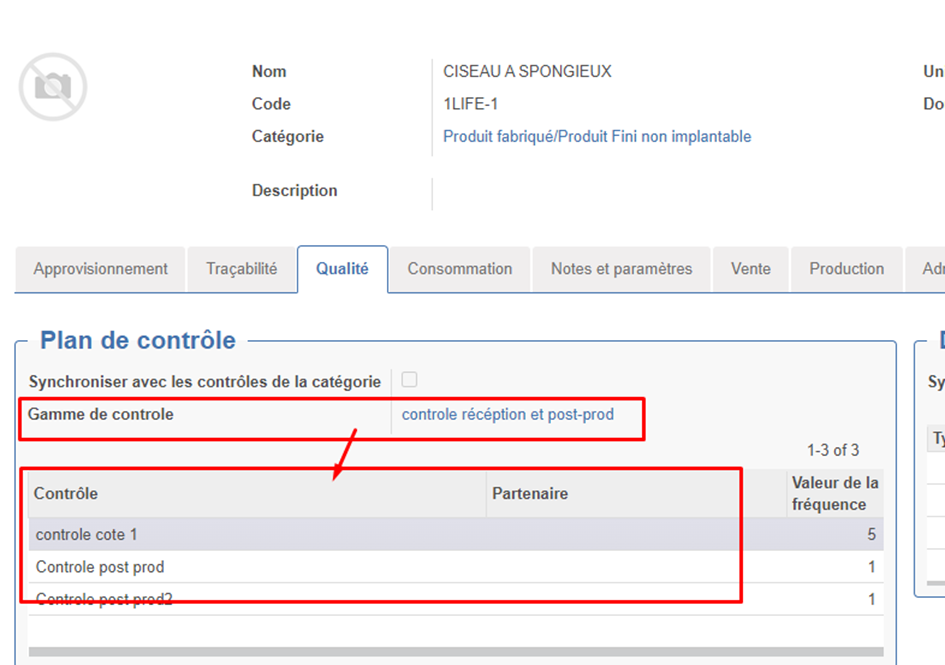
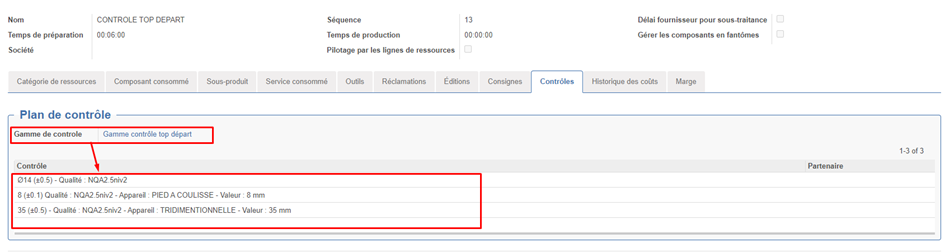
<span style="font-family: 'Courier New'; mso-fareast-font-family: 'Courier New';"><span style="mso-list: Ignore;">o<span style="font: 7.0pt 'Times New Roman';"> </span></span></span>Le champs gamme de contrôle permet d’associer une gamme de contrôle à la ligne de gamme. **A l’enregistrement** les lignes de gamme de contrôles de la gamme. Sélectionnées viendront alimenter la zone classique des contrôles qualité Open-Prod
<span style="mso-no-proof: yes;"> </span>

<span style="mso-no-proof: yes;"> </span>

![](https://docs.myfab.fr/uploads/images/gallery/2024-09/embedded-image-hg6ey0gj.png)

![](https://docs.myfab.fr/uploads/images/gallery/2024-09/embedded-image-9npxe5c8.png)

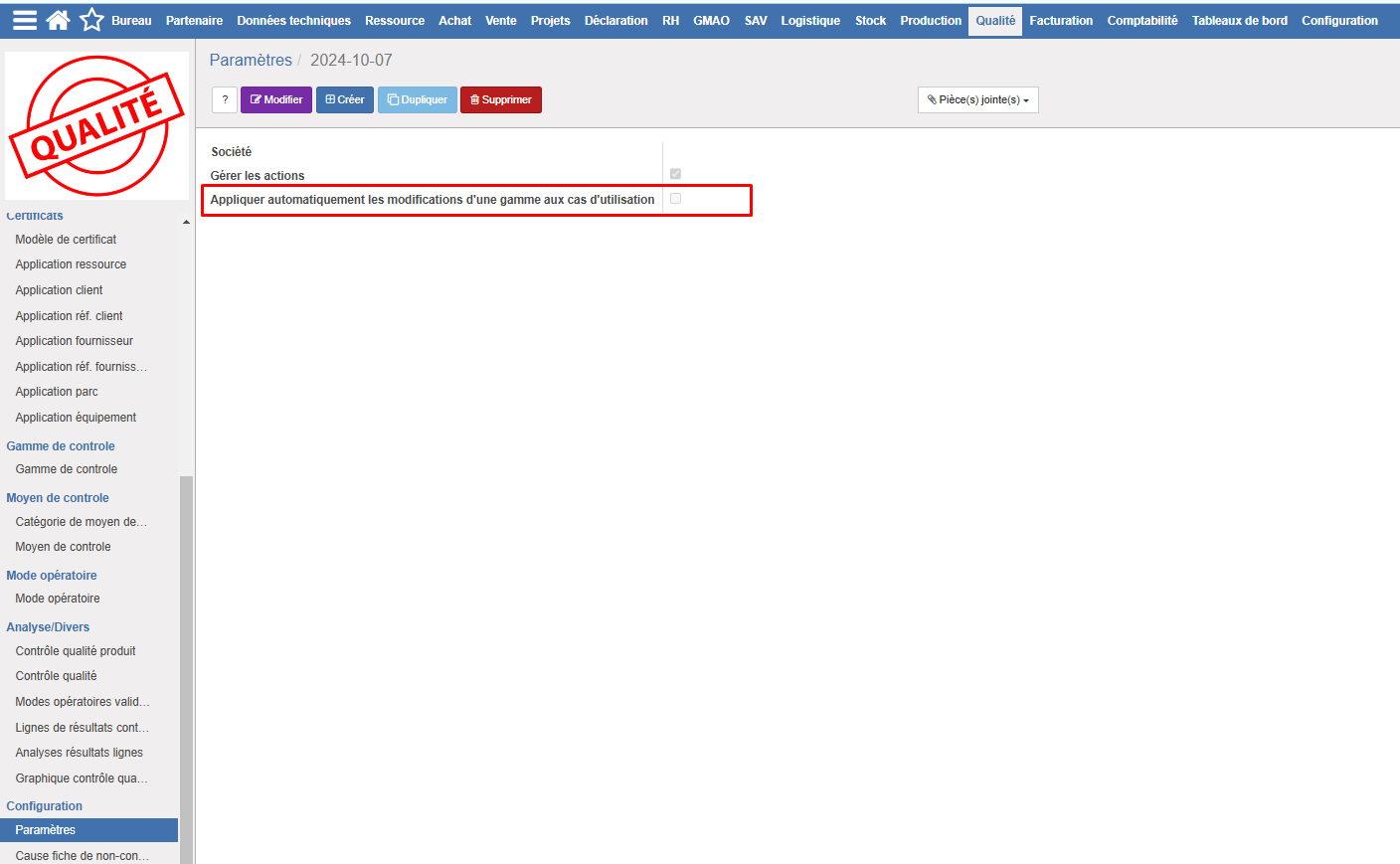
<span style="font-family: Wingdings; mso-fareast-font-family: Wingdings; mso-bidi-font-family: Wingdings;"><span style="mso-list: Ignore;">Ø<span style="font: 7.0pt 'Times New Roman';"> </span></span></span>Un paramètre dans les paramètres qualité permet d'appliquer automatiquement les modifications d'une gamme aux cas d'utilisation lors de la validation.

[![image.png](https://docs.myfab.fr/uploads/images/gallery/2024-11/scaled-1680-/wDSimage.png)](https://docs.myfab.fr/uploads/images/gallery/2024-11/wDSimage.png)
# Formule de calcul de quantité à contrôler

#### <span style="mso-fareast-font-family: 'Calibri Light'; mso-fareast-theme-font: major-latin; mso-bidi-font-family: 'Calibri Light'; mso-bidi-theme-font: major-latin; mso-fareast-language: FR;"><span style="mso-list: Ignore;">1.<span style="font: 7.0pt 'Times New Roman';"> </span></span></span><span style="mso-fareast-language: FR;">Résumé</span>

<span style="mso-fareast-language: FR;">Utiliser une formule de calcul avancée qui permette de déterminer le nombre d’échantillons à contrôler dans un contrôle qualité. Cela permet par exemple de définir une règle d’échantillonnage en pourcentage ou par palier.</span>

<span style="mso-fareast-language: FR;"> </span><span style="mso-fareast-font-family: 'Calibri Light'; mso-fareast-theme-font: major-latin; mso-bidi-font-family: 'Calibri Light'; mso-bidi-theme-font: major-latin; mso-fareast-language: FR;"><span style="mso-list: Ignore;">2.<span style="font: 7.0pt 'Times New Roman';"> </span></span></span><span style="mso-fareast-language: FR;">Utilisation</span>

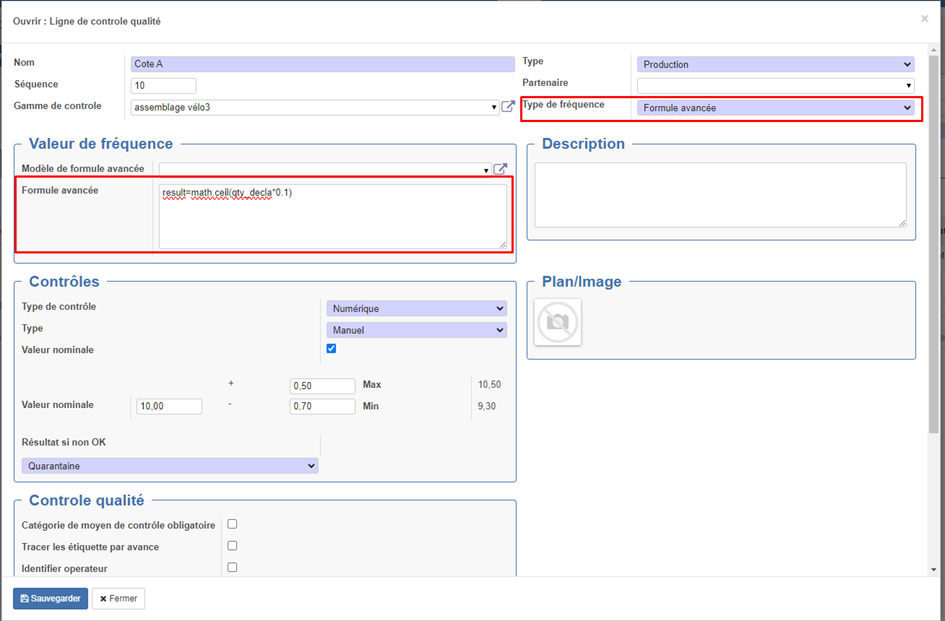
<span style="mso-fareast-language: FR;">Type de fréquence Formule avancé :</span>

<span style="mso-fareast-language: FR;">Ce mode de fréquence permet de saisir une formule dans la zone formule avancée.</span>

<span style="mso-fareast-language: FR;">La zone Formule avancée est une zone de saisie de code python. Dans cette zone, il faut d’alimenter la variable « result » avec le nombre d’échantillons à contrôler pour ce contrôle dans cette déclaration.</span>

<span style="mso-fareast-language: FR;">Voici le détail des variables utilisables dans cette zone :</span>

> Pour tous les types de déclaration :  
> env : environnement  
> datetime, math (ou fonction pour arrondi au plus proche, arrondi sup,arrondi inf et troncature), max, min  
> result : variable à alimenter en retour contentant le nombre d’échantillons à contrôler pour ce contrôle dans cette délcaration.
> 
> Si on est sur une déclaration de type : production, post-prod et hors-production :  
> qty\_wo : Quantité de l’OT (quantité à produire prévue)  
> qty\_decla : quantité de la déclaration qu’on est en train de faire.  
> qty\_prod : quantité déjà produite de l’OT (avant la déclaration en cours)  
> qty\_already\_declared : Quantité déclarée en contrôle qualité pour cet OT (somme des quantité totale des déclarations de contrôle qualité non annulées)  
> nb\_decla : Nombre de lignes de déclaration déjà créées pour ce contrôle pour cet OT (nb de lignes de déclaration dans des déclarations non annulées pour ce contrôle qualité)  
> wo\_rc : objet en cours
> 
> Si on est sur une déclaration de type : réception, post-réception… :  
> qty\_mov : Quantité du mouvement  
> qte\_decla : quantité de la déclaration qu’on est en train de faire.  
> move\_rc : objet en cours
<span style="mso-no-proof: yes;"> </span>

![](https://docs.myfab.fr/uploads/images/gallery/2024-09/embedded-image-pu2frjc8.png)

Pour éviter de saisir le code python à chaque fois, il est possible d’utiliser des modèles de formules.

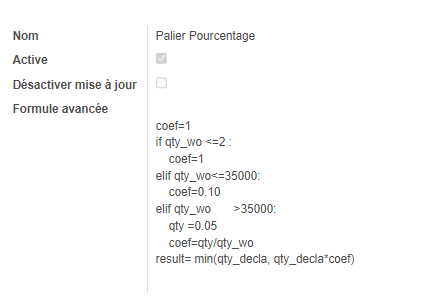
Créer les formules modèles soit directement depuis un contrôle, soit depuis le menu : *Qualité&gt;Configuration&gt;Formule model*

[![image.png](https://docs.myfab.fr/uploads/images/gallery/2024-10/scaled-1680-/4Kximage.png)](https://docs.myfab.fr/uploads/images/gallery/2024-10/4Kximage.png)

<p class="callout success"><span style="text-decoration: underline;">**Remarque**</span>, depuis la saisie d’une gamme de contrôle, si on est en Type de fréquence Formule avancée, il est possible de choisir directement le modèle de formule.</p>

<p class="callout success"><span style="text-decoration: underline;">**Remarque :**</span> certaines formules sont importées avec l'installation du module, ce sont des exemples que vous pouvez utiliser, et désactiver si nécessaire. Attention de bien cocher "désactiver la mise à jour" si vous réalisez des modifications sur les données de bases, sinon vos modifications seront écrasées lors des mises à jours. </p>

#### <span style="mso-fareast-font-family: 'Calibri Light'; mso-fareast-theme-font: major-latin; mso-bidi-font-family: 'Calibri Light'; mso-bidi-theme-font: major-latin;"><span style="mso-list: Ignore;">3.<span style="font: 7.0pt 'Times New Roman';"> </span></span></span>Exemples de formules

<span style="font-family: Wingdings; mso-fareast-font-family: Wingdings; mso-bidi-font-family: Wingdings;"><span style="mso-list: Ignore;">Ø<span style="font: 7.0pt 'Times New Roman';"> </span></span></span>Echantillonnage 10% :

`<span style="color: black; mso-color-alt: windowtext;">result=math.ceil(qty_decla*0.1)</span>`

<span style="font-family: Wingdings; mso-fareast-font-family: Wingdings; mso-bidi-font-family: Wingdings;"><span style="mso-list: Ignore;">Ø<span style="font: 7.0pt 'Times New Roman';"> </span></span></span>Palier 32/150 :

*qty =0*  
*if qty\_wo &lt;=5 :*  
 *qty= qty\_wo*  
*elif qty\_ wo &lt;=32 :*  
 *qty =5*   
*elif qty\_wo &gt;32 and qty\_ wo &lt;=150 :*  
 *qty =33*  
*qty =qty - qty\_already\_declared*  
*qty =qty if qty &gt;0 else 0*  
*result= min(qty\_decla,qty )*

<span style="font-family: Wingdings; mso-fareast-font-family: Wingdings; mso-bidi-font-family: Wingdings;"><span style="mso-list: Ignore;">Ø<span style="font: 7.0pt 'Times New Roman';"> </span></span></span><span style="mso-spacerun: yes;"> </span>Palier <span lang="EN-US" style="mso-ansi-language: EN-US;">NQA 1 S-3</span>

*qty =0*  
*coef=1*  
*if qty\_wo &lt;=2 :*  
 *coef=1*  
*if qty\_wo &lt;=35000:*  
 *qty =13*  
 *coef=qty/qty\_wo*  
*elif qty\_wo &gt;35000:*  
 *qty =50*  
 *coef=qty/qty\_wo*  
*result= min(qty\_decla, qty\_decla\*coef)*

<span style="font-family: Wingdings; mso-fareast-font-family: Wingdings; mso-bidi-font-family: Wingdings;"><span style="mso-list: Ignore;">Ø<span style="font: 7.0pt 'Times New Roman';"> </span></span></span>Echantillon 10 pièce fixe

*<span style="color: black; mso-color-alt: windowtext;">result=10</span>*

# Contrôle qualité "Hors production"

#### <span style="mso-fareast-font-family: 'Calibri Light'; mso-fareast-theme-font: major-latin; mso-bidi-font-family: 'Calibri Light'; mso-bidi-theme-font: major-latin; mso-fareast-language: FR;"><span style="mso-list: Ignore;">1.<span style="font: 7.0pt 'Times New Roman';"> </span></span></span><span style="mso-fareast-language: FR;">Résumé</span>

<span style="mso-fareast-language: FR;">Ce nouveau type de contrôle s’applique à des contrôles à réaliser sur une ligne de gamme de fabrication. Ils pourront êtres générées et valider indépendamment des déclarations de production. </span>

<span style="mso-fareast-language: FR;">Cela permet plus de souplesse dans la génération des contrôles. Par exemple, il est possible de saisir de créer une déclaration de contrôle, commencer à la saisir, l’enregistrer sans la valider, puis de revenir dessus pour poursuivre la saisie (par exemple par un autre opérateur).</span>

<span style="mso-fareast-language: FR;">Il devient aussi possible de pré-générer toutes les lignes de contrôles pour la quantité totale de l’OF.</span>

#### <span style="mso-fareast-language: FR;">2. Exemples chronologie de saisie avec différents type de contrôles utilisable en production</span>

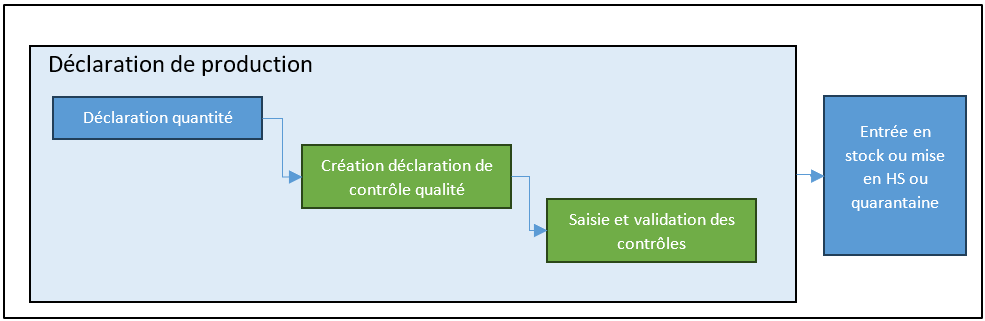
**<span style="font-family: Wingdings; mso-fareast-font-family: Wingdings; mso-bidi-font-family: Wingdings;"><span style="mso-list: Ignore;">Ø<span style="font-style: normal; font-variant: normal; font-size-adjust: none; font-kerning: auto; font-optical-sizing: auto; font-feature-settings: normal; font-variation-settings: normal; font-stretch: normal; font-size: 7pt; line-height: normal; font-family: 'Times New Roman';"> </span></span></span>Contrôles de type : Production**

<span style="font-family: 'Courier New'; mso-fareast-font-family: 'Courier New';"><span style="mso-list: Ignore;">o<span style="font: 7.0pt 'Times New Roman';"> </span></span></span>Clique sur déclaration de production

<span style="font-family: 'Courier New'; mso-fareast-font-family: 'Courier New';"><span style="mso-list: Ignore;">o<span style="font: 7.0pt 'Times New Roman';"> </span></span></span>Saisie de la quantité

<span style="font-family: 'Courier New'; mso-fareast-font-family: 'Courier New';"><span style="mso-list: Ignore;">o<span style="font: 7.0pt 'Times New Roman';"> </span></span></span>Saisie du contrôle qualité

<span style="font-family: 'Courier New'; mso-fareast-font-family: 'Courier New';"><span style="mso-list: Ignore;">o<span style="font: 7.0pt 'Times New Roman';"> </span></span></span>Tant que le contrôle qualité n’est pas saisi et validé -&gt; impossible de valider la production

[![image.png](https://docs.myfab.fr/uploads/images/gallery/2025-01/scaled-1680-/image.png)](https://docs.myfab.fr/uploads/images/gallery/2025-01/image.png)

**<span style="font-family: Wingdings; mso-fareast-font-family: Wingdings; mso-bidi-font-family: Wingdings;"><span style="mso-list: Ignore;">Ø<span style="font-style: normal; font-variant: normal; font-size-adjust: none; font-kerning: auto; font-optical-sizing: auto; font-feature-settings: normal; font-variation-settings: normal; font-stretch: normal; font-size: 7pt; line-height: normal; font-family: 'Times New Roman';"> </span></span></span>Contrôles de type : Hors prod**

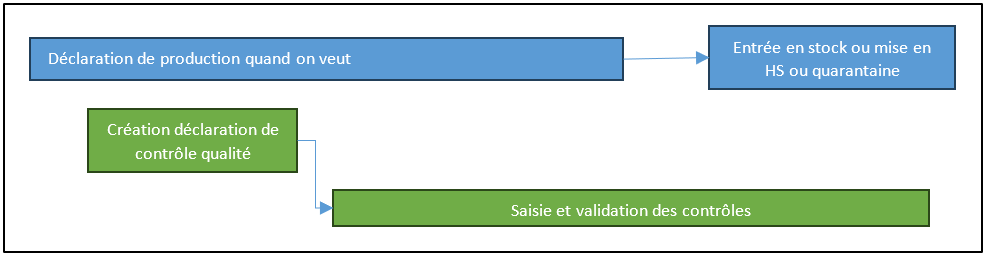
<span style="font-family: 'Courier New'; mso-fareast-font-family: 'Courier New';"><span style="mso-list: Ignore;">o<span style="font: 7.0pt 'Times New Roman';"> </span></span></span>Cas 1 : libre

<span style="font-family: Wingdings; mso-fareast-font-family: Wingdings; mso-bidi-font-family: Wingdings;"><span style="mso-list: Ignore;">§<span style="font: 7.0pt 'Times New Roman';"> </span></span></span>Dans ce cas il possible de créer, saisir et valider des contrôles qualité hors prod indépendamment des déclaration de quantité produite.

[![image.png](https://docs.myfab.fr/uploads/images/gallery/2025-01/scaled-1680-/KeXimage.png)](https://docs.myfab.fr/uploads/images/gallery/2025-01/KeXimage.png)
<span style="font-family: 'Courier New'; mso-fareast-font-family: 'Courier New';"><span style="mso-list: Ignore;">o<span style="font: 7.0pt 'Times New Roman';"> </span></span></span>Cas 2 : case interdire de produire plus que la quantité validé en hors-prod

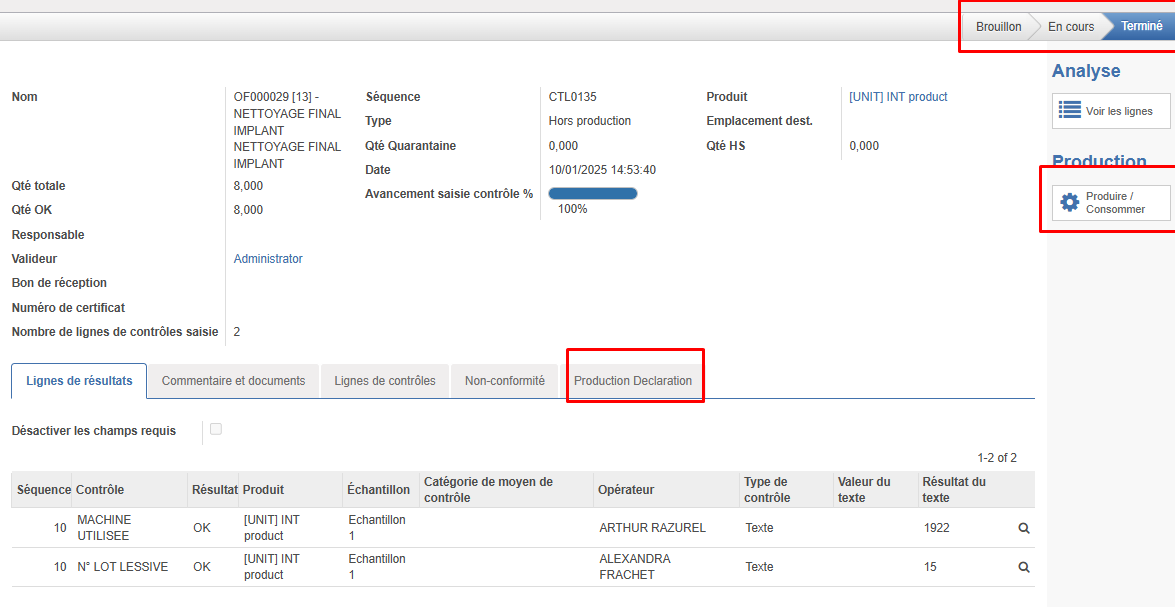
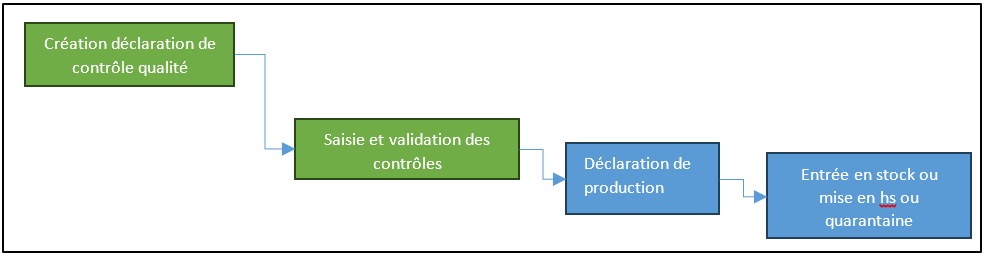
<span style="font-family: Wingdings; mso-fareast-font-family: Wingdings; mso-bidi-font-family: Wingdings;"><span style="mso-list: Ignore;">§<span style="font: 7.0pt 'Times New Roman';"> </span></span></span>Dans ce cas vous serez obligé d’avoir créé, saisis et validé un contrôle qualité hors prod avant de pouvoir déclarer des quantités produites.

<span style="font-family: Wingdings; mso-fareast-font-family: Wingdings; mso-bidi-font-family: Wingdings;"><span style="mso-list: Ignore;">§<span style="font: 7.0pt 'Times New Roman';"> </span></span></span>Les quantités produites seront en phases avec les contrôles qualités et il y aura un lien entre les déclaration de production et les contrôles hors prod.

[![image.png](https://docs.myfab.fr/uploads/images/gallery/2025-01/scaled-1680-/XQBimage.png)](https://docs.myfab.fr/uploads/images/gallery/2025-01/XQBimage.png)
**<span style="font-family: Wingdings; mso-fareast-font-family: Wingdings; mso-bidi-font-family: Wingdings;"><span style="mso-list: Ignore;">Ø<span style="font-style: normal; font-variant: normal; font-size-adjust: none; font-kerning: auto; font-optical-sizing: auto; font-feature-settings: normal; font-variation-settings: normal; font-stretch: normal; font-size: 7pt; line-height: normal; font-family: 'Times New Roman';"> </span></span></span>Contrôles de type : <span style="mso-spacerun: yes;"> </span>Post-prod**

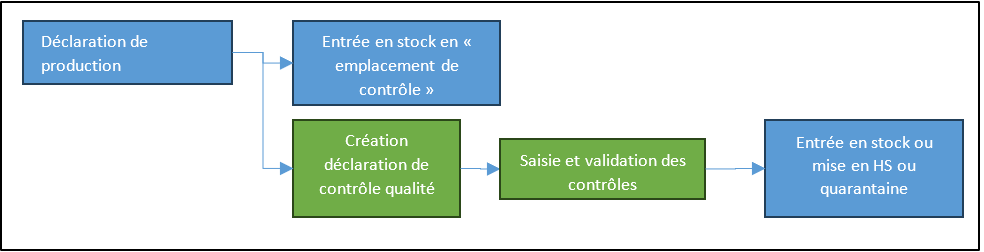
<span style="font-family: 'Courier New'; mso-fareast-font-family: 'Courier New';"><span style="mso-list: Ignore;">o<span style="font: 7.0pt 'Times New Roman';"> </span></span></span>Dans ce cas, les quantités déclarées en productions vont dans un emplacement de contrôle, la validation du contrôle qualité va soit libérer les quantités dans l’emplacement de production soit les mettre en rebut ou en quarantaines

<span style="font-family: 'Courier New'; mso-fareast-font-family: 'Courier New';"><span style="mso-list: Ignore;">o<span style="font: 7.0pt 'Times New Roman';"> </span></span></span>Attention ce type de contrôle se renseigne sur la fiche produit et pas dans la gamme, par conséquent, il ne s’applique qu’à la dernière OT !

[![image.png](https://docs.myfab.fr/uploads/images/gallery/2025-01/scaled-1680-/NqPimage.png)](https://docs.myfab.fr/uploads/images/gallery/2025-01/NqPimage.png)
#### <span style="mso-fareast-font-family: 'Calibri Light'; mso-fareast-theme-font: major-latin; mso-bidi-font-family: 'Calibri Light'; mso-bidi-theme-font: major-latin; mso-fareast-language: FR;"><span style="mso-list: Ignore;">3.<span style="font: 7.0pt 'Times New Roman';"> </span></span></span><span style="mso-fareast-language: FR;">Utilisation</span>

Création d’un contrôle (ou gamme de contrôle) de type hors prod.
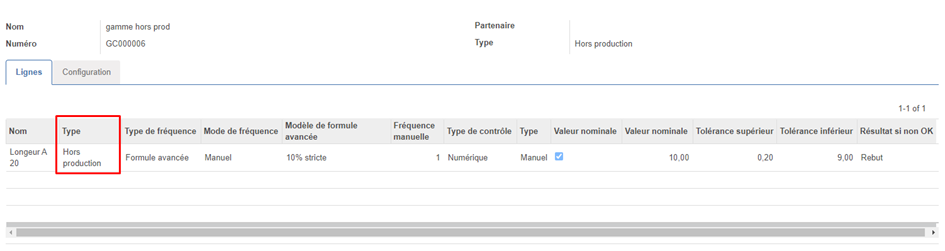
![](https://docs.myfab.fr/uploads/images/gallery/2024-09/embedded-image-fepqkfic.png)

<span style="mso-no-proof: yes;"> </span>

Application de la gamme de contrôle à une ligne de gamme de fabrication.
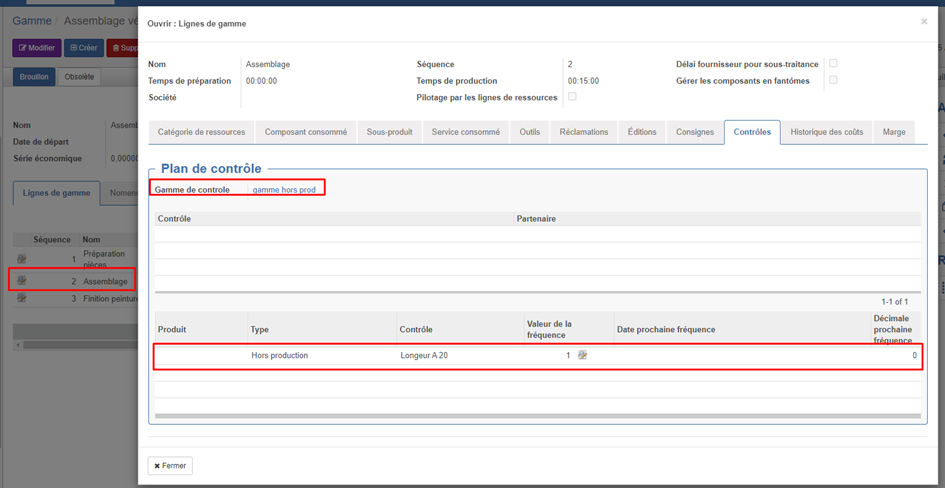
![](https://docs.myfab.fr/uploads/images/gallery/2024-09/embedded-image-htdqhce1.png)

<p class="callout success"><span style="mso-no-proof: yes;"> </span>**<u>Remarque :</u>** si on n’utilise pas de gamme de contrôle, il est possible d’affecter directement un nouveau contrôle qualité dans la zone des listes des contrôles.</p>

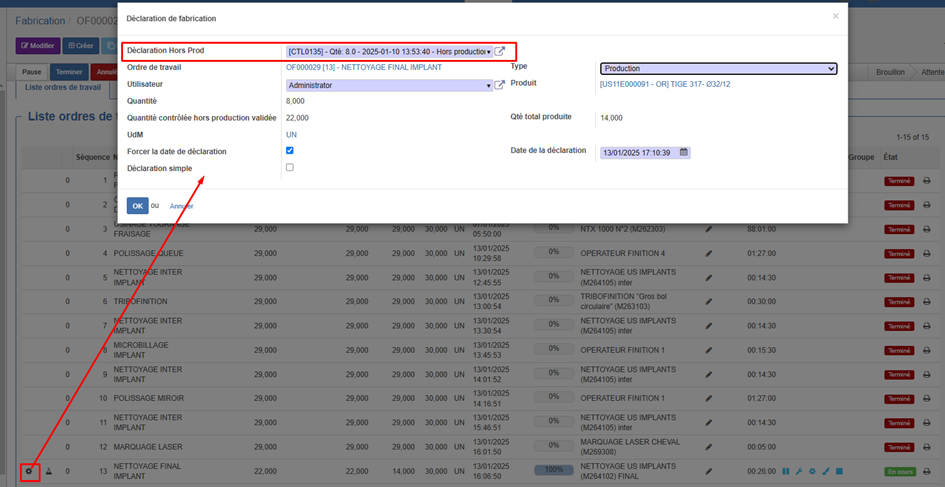
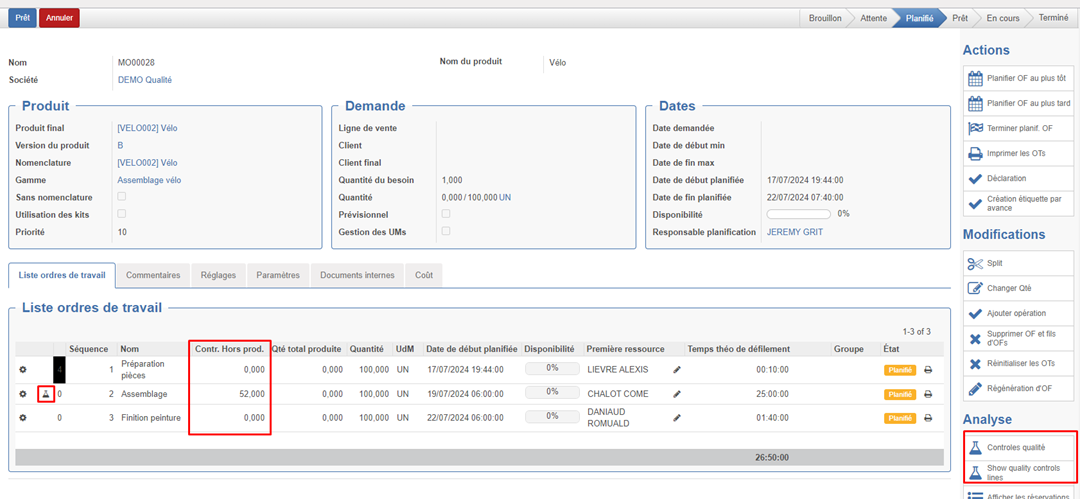
Depuis un OF on voit maintenant apparaitre la quantité qu’on a déjà déclarer en contrôle « hors production ».
<span style="mso-no-proof: yes;"> </span><span style="mso-spacerun: yes;"> </span>![](https://docs.myfab.fr/uploads/images/gallery/2024-09/embedded-image-hx7k6t9w.png)

Le bouton ![](https://docs.myfab.fr/uploads/images/gallery/2024-09/embedded-image-1jenlmvz.png) apparait sur les lignes d’OT pour lesquelles on a configurer des contrôles Hors production. Il permet de générer des déclarations de contrôle qualité (et de les remplies on non)

![](https://docs.myfab.fr/uploads/images/gallery/2024-09/embedded-image-bho7syyw.png)

<span style="mso-no-proof: yes;"> </span>

La case « Ne pas remplir immédiatement la déclaration » permet de ne pas afficher la déclaration mais uniquement de la générer.

Les boutons Contrôle qualité ![](https://docs.myfab.fr/uploads/images/gallery/2024-09/embedded-image-3xwy2qf7.png) dans analyse permet de visualiser la liste des contrôles qualité génères pour l’OF (qu’ils soient en prod, post-prod ou hors prod)

<span style="mso-no-proof: yes;"> </span>

![](https://docs.myfab.fr/uploads/images/gallery/2024-09/embedded-image-s0yjwnqr.png)

![](https://docs.myfab.fr/uploads/images/gallery/2025-01/embedded-image-hlopetjt.png)

[![image.png](https://docs.myfab.fr/uploads/images/gallery/2025-01/scaled-1680-/9mGimage.png)](https://docs.myfab.fr/uploads/images/gallery/2025-01/9mGimage.png)

#### 4. Blocage et avertissement pour interdire de produire plus que la quantité contrôlée et validée en "Hors production"

- Avertissement : si on s’apprête à produire plus que la quantité validé en contrôle hors production.

####  ![](https://docs.myfab.fr/uploads/images/gallery/2024-09/embedded-image-9qra1vjk.png)
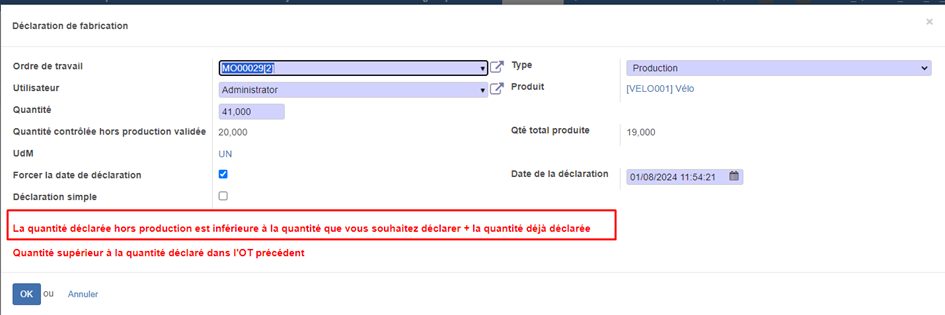
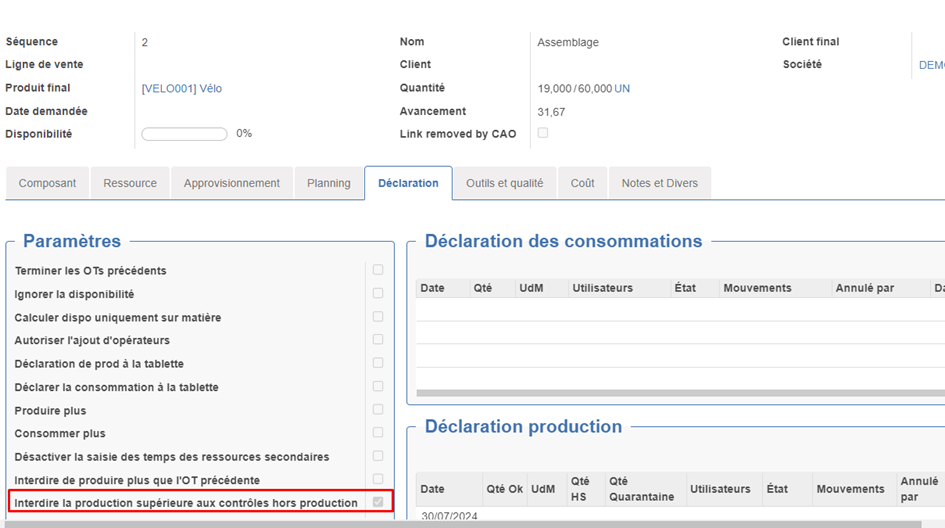
- Blocage : <span style="font-family: 'Courier New'; mso-fareast-font-family: 'Courier New';"><span style="mso-list: Ignore;"><span style="font: 7.0pt 'Times New Roman';"> </span></span></span>
    - Si cette case est cochée -&gt; lors d’une déclaration de production (quel que soit l’interface de déclaration), il ne sera pas possible de produire plus que la quantité contrôlée et validée en « Hors production »
    - De plus, il sera nécessaire de produire à partir d'une déclaration de contrôle validée. De cette façon on ne peut produire que ce qui a été contrôlé.
![](https://docs.myfab.fr/uploads/images/gallery/2024-09/embedded-image-zn8mrslb.png)

<p class="callout success">Remarque : ce blocage s'appliquera quelque soit l'interface de déclaration</p>

# Améliorations diverses

#### 1. Résumé

Améliorations divers

#### 2. Ajout de lignes de contrôles

Dans certains cas, en fonction des résultats des contrôles réalisés, il peut être nécessaire de contrôler d'avantage de pièce.

Pour cela, nous avons ajouté un bouton sur déclaration de contrôle permettant d’ajouter des lignes de contrôles.
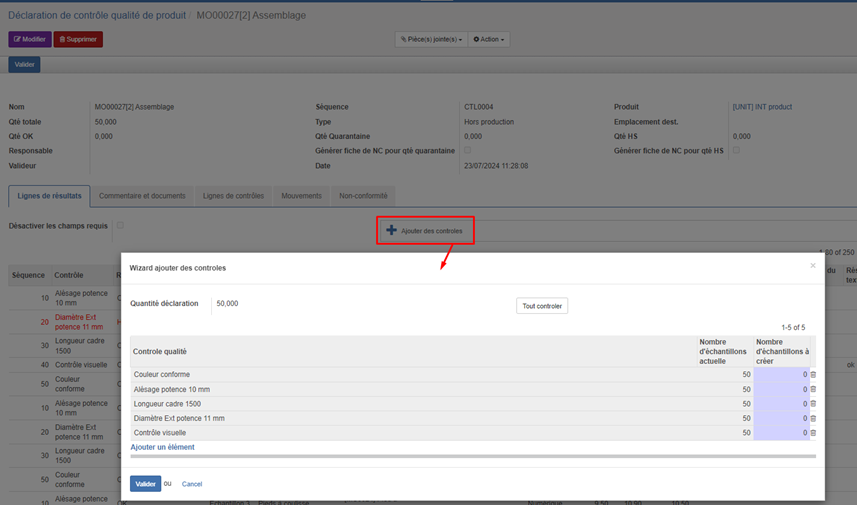
![](https://docs.myfab.fr/uploads/images/gallery/2024-09/embedded-image-cjdxzkho.png)

#### 3. Ajout code couleur sur les lignes permettant de voir en rouge les contrôles HS et en orange les contrôles en quarantaine

![](https://docs.myfab.fr/uploads/images/gallery/2024-09/embedded-image-28yu0oi4.png)

#### 4. Modification comportement bouton « calculer » :

- Maintenant ce bouton calcule les quantités OK, Quarantaine et HS de la façon suivante. 
    - Qté HS = nombre d’échantillons qui ont au moins 1 contrôle HS
    - Qté Quarantaine = Nb d’échantillons qui ont au moins 1 contrôle quarantaine mais qui n’ont pas de contrôle HS
    - Qté OK = Quantité totale – quantité Quarantaine – quantité HS
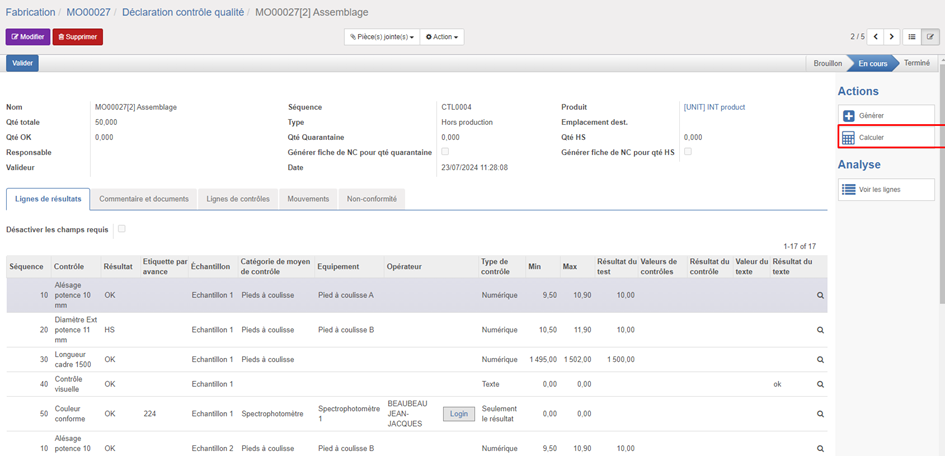
![](https://docs.myfab.fr/uploads/images/gallery/2024-09/embedded-image-aiycxf8j.png)

#### 5. Ajout d'un champ sur liste des valeurs de contrôle « Ligne est fini »

Ajout champs sur liste des valeurs de contrôle « Ligne est fini » permettant de savoir si toutes les valeurs obligatoires de la ligne sont remplies.
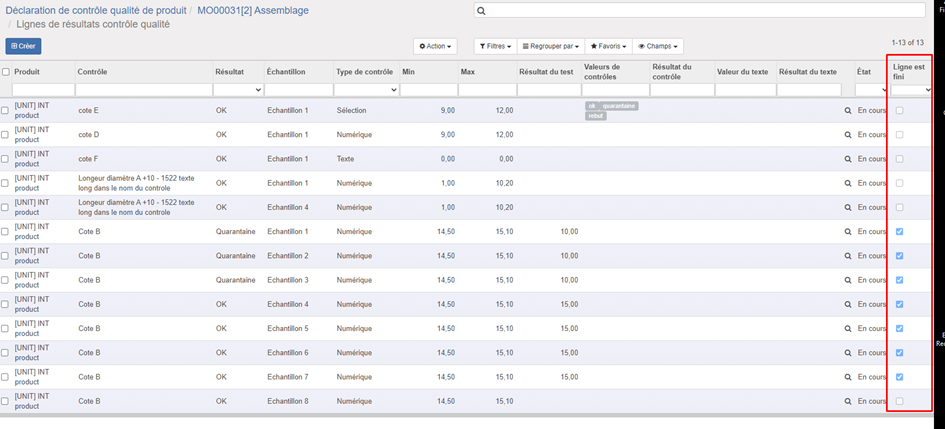
![](https://docs.myfab.fr/uploads/images/gallery/2024-09/embedded-image-trjy1fbu.png)

##### 6. Amélioration de la zone de de formule de calcul du min et du max dans le cas d’un contrôle de type numérique

Amélioration de la zone de de formule de calcul du min et du max dans le cas d’un contrôle de type numérique afin de pouvoir calculer des valeurs min et max qui dépendent du produit, de l'OF ou de tout autre paramètres.

> *Les variables accessibles sont les suivantes :*   
> *Pour tous les types de déclaration :*   
> *• env : environnement*   
> *• datetime, math (ou fonction pour arrondi au plus proche, arrondi sup,arrondi inf et troncature), max, min*   
> *• result : Récupère la valeur*   
> *• qty\_decla : quantité de la déclaration qu’on est en train de faire*  
> *• param\[\] : paramètres du produit fini*
> 
> *décalation de type : production, post-prod, hors-prod :*   
> *• wo\_rc : objet en cours*
> 
> *Si on est sur une déclaration de type : réception, post-réception… :*   
> *• move\_rc : objet en cours*
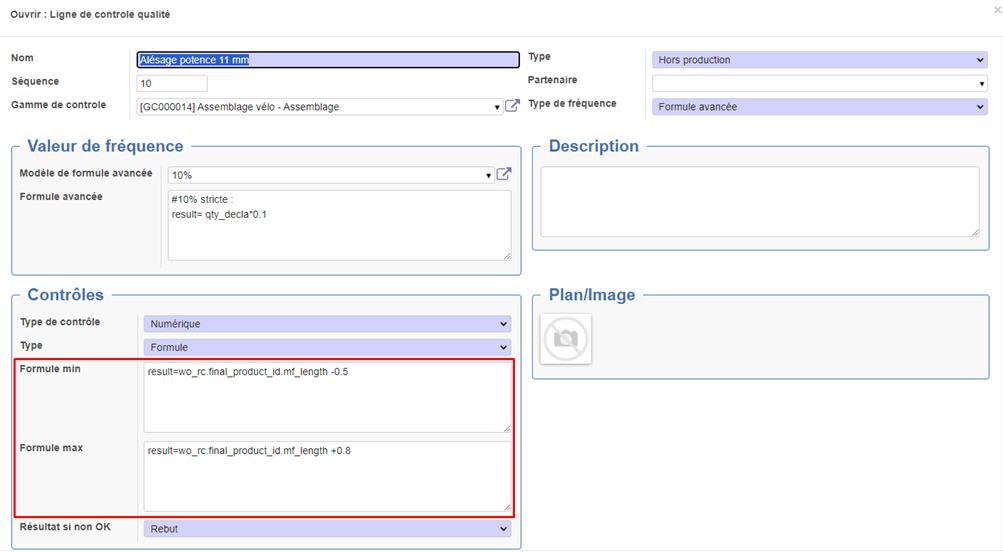
![](https://docs.myfab.fr/uploads/images/gallery/2024-09/embedded-image-52lj4e2s.png)

#### 7. Nouveau paramètre pour interdire de produire plus que la quantité produite sur l'OT précédente

<p class="callout info"><span style="mso-fareast-language: FR;">Remarque : cet fonctionnalité est incluse dans le module technique « Myfab\_production » qui s’installe automatiquement avec « Myfab\_base »</span></p>

- <span style="mso-fareast-language: FR;">Avertissement uniquement :</span>

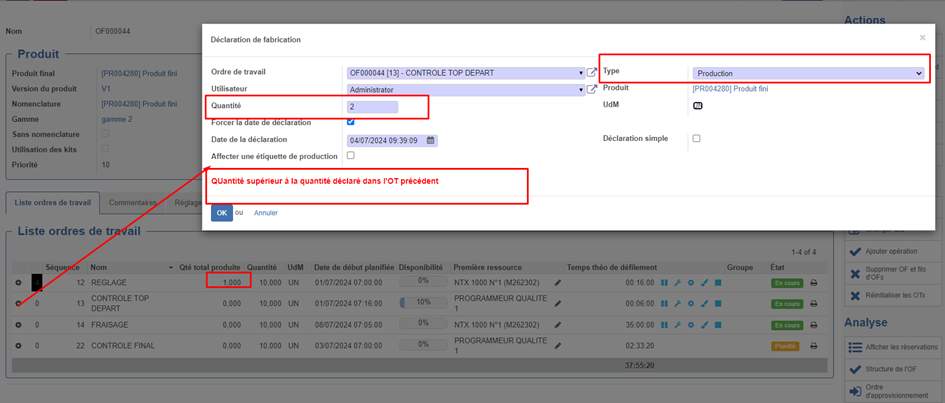
<span style="mso-fareast-language: FR;">Il n’y a aucun paramétrage spécifique à faire, des qu’on déclare une quantité produite sur un OT supérieur à la quantité de l’OT précédente (s’il y en a), un message d’avertissement (non bloquant) apparait pour alerter qu’on s’apprête à produire plus que l’OT précédente. </span>

<span style="mso-fareast-language: FR;">Cette alerte n’apparait que dans le Wizards de déclaration de production depuis l’OT de l’interface standard. Exemple :</span>

<span style="mso-fareast-language: FR;">![](https://docs.myfab.fr/uploads/images/gallery/2024-09/embedded-image-zoe4lfb5.png)</span>

- <span style="mso-fareast-language: FR;">Blocage pour interdire de produire plus que l'OT précédente</span>

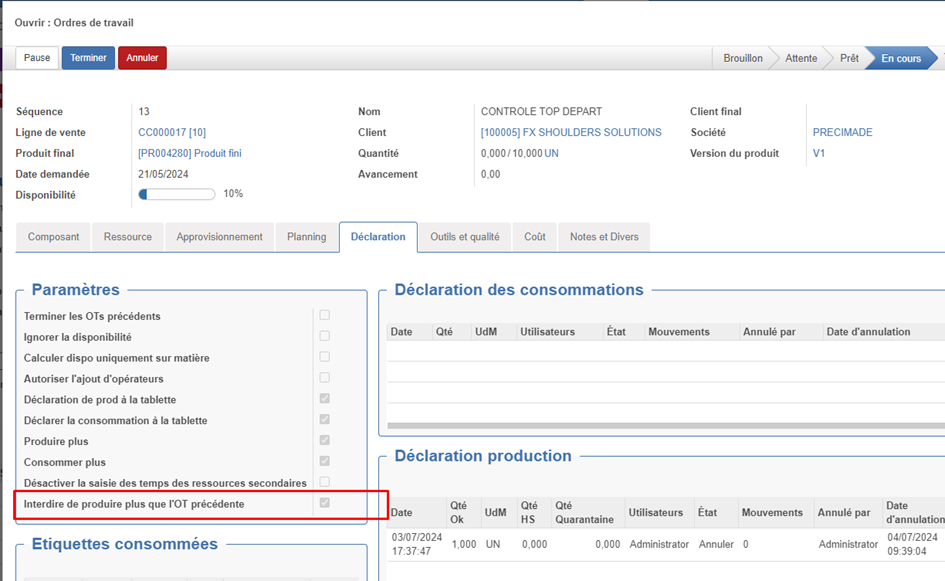
<span style="mso-fareast-language: FR;">Si dans les OT on coche la case « Interdire de produire plus que l'OT précédente ». il ne sera pas possible de produire plus que l’opération précédente.</span>

<p class="callout success"><span style="mso-fareast-language: FR;"><span style="font-size: 11.0pt; line-height: 107%; font-family: 'Calibri',sans-serif; mso-ascii-theme-font: minor-latin; mso-fareast-font-family: Calibri; mso-fareast-theme-font: minor-latin; mso-hansi-theme-font: minor-latin; mso-bidi-font-family: Arial; mso-bidi-theme-font: minor-bidi; mso-ansi-language: FR; mso-fareast-language: FR; mso-bidi-language: AR-SA;">Ce message bloquant s’applique quelque soit l’interface de déclaration mais ne se déclenche qu’à la fin de la déclaration</span></span></p>

<span style="mso-fareast-language: FR;"><span style="font-size: 11.0pt; line-height: 107%; font-family: 'Calibri',sans-serif; mso-ascii-theme-font: minor-latin; mso-fareast-font-family: Calibri; mso-fareast-theme-font: minor-latin; mso-hansi-theme-font: minor-latin; mso-bidi-font-family: Arial; mso-bidi-theme-font: minor-bidi; mso-ansi-language: FR; mso-fareast-language: FR; mso-bidi-language: AR-SA;">![](https://docs.myfab.fr/uploads/images/gallery/2024-09/embedded-image-j3tmqx7m.png)</span></span>

# Non-conformité avancée

# Installation

Version compatible V9 (à partir de la v9.13)

[![image.png](https://docs.myfab.fr/uploads/images/gallery/2026-02/scaled-1680-/image.png)](https://docs.myfab.fr/uploads/images/gallery/2026-02/image.png)
# Approche et méthodologique

Le module **Non<span style="font-family: 'Cambria Math',serif; mso-bidi-font-family: 'Cambria Math';">‑</span>Conformit<span style="mso-ascii-font-family: Calibri; mso-hansi-font-family: Calibri; mso-bidi-font-family: Calibri;">é</span> Avanc<span style="mso-ascii-font-family: Calibri; mso-hansi-font-family: Calibri; mso-bidi-font-family: Calibri;">é</span>e** enrichie le standard openprod et s’appuie sur des outils qualité reconnus pour rendre la fiche de non<span style="font-family: 'Cambria Math',serif; mso-bidi-font-family: 'Cambria Math';">‑</span>conformit<span style="mso-ascii-font-family: Calibri; mso-hansi-font-family: Calibri; mso-bidi-font-family: Calibri;">é</span> **plus pertinente** et **opérationnelle** :

<span style="font-family: Symbol; mso-fareast-font-family: Symbol; mso-bidi-font-family: Symbol;"><span style="mso-list: Ignore;">·<span style="font: 7.0pt 'Times New Roman';"> </span></span></span>La **méthode 8D** structure le workflow de **D0 (création)** à **D8 (capitalisation)** ;

<span style="font-family: Symbol; mso-fareast-font-family: Symbol; mso-bidi-font-family: Symbol;"><span style="mso-list: Ignore;">·<span style="font: 7.0pt 'Times New Roman';"> </span></span></span>Le **QQOQCCP** assure une description **claire et factuelle** du problème dès le départ ;

<span style="font-family: Symbol; mso-fareast-font-family: Symbol; mso-bidi-font-family: Symbol;"><span style="mso-list: Ignore;">·<span style="font: 7.0pt 'Times New Roman';"> </span></span></span>Le **diagramme d’Ishikawa (5M)** aide à trouver les causes de l'**occurrences** et **non<span style="font-family: 'Cambria Math',serif; mso-bidi-font-family: 'Cambria Math';">‑</span>d<span style="mso-ascii-font-family: Calibri; mso-hansi-font-family: Calibri; mso-bidi-font-family: Calibri;">é</span>tections** ;

<span style="font-family: Symbol; mso-fareast-font-family: Symbol; mso-bidi-font-family: Symbol;"><span style="mso-list: Ignore;">·<span style="font: 7.0pt 'Times New Roman';"> </span></span></span>L’analyse **5 Pourquoi** permet de **remonter aux causes racines**.

Cette intégration évite les oublis, **structure l’analyse** et améliore **la qualité du traitement**.

# Présentation du formulaire

## D0 – Création de la NC (Brouillon)

<span style="font-family: Symbol; mso-fareast-font-family: Symbol; mso-bidi-font-family: Symbol;"><span style="mso-list: Ignore;">·<span style="font: 7.0pt 'Times New Roman';"> </span></span></span>Qualité → Assistant de création de Non<span style="font-family: 'Cambria Math',serif; mso-bidi-font-family: 'Cambria Math';">‑</span>Conformit<span style="mso-ascii-font-family: Calibri; mso-hansi-font-family: Calibri; mso-bidi-font-family: Calibri;">é</span>s : Cet assistant a été revue pour donner plus de liberter lors de la création d'une non conformité :

[![image.png](https://docs.myfab.fr/uploads/images/gallery/2026-02/scaled-1680-/bb9image.png)](https://docs.myfab.fr/uploads/images/gallery/2026-02/bb9image.png)
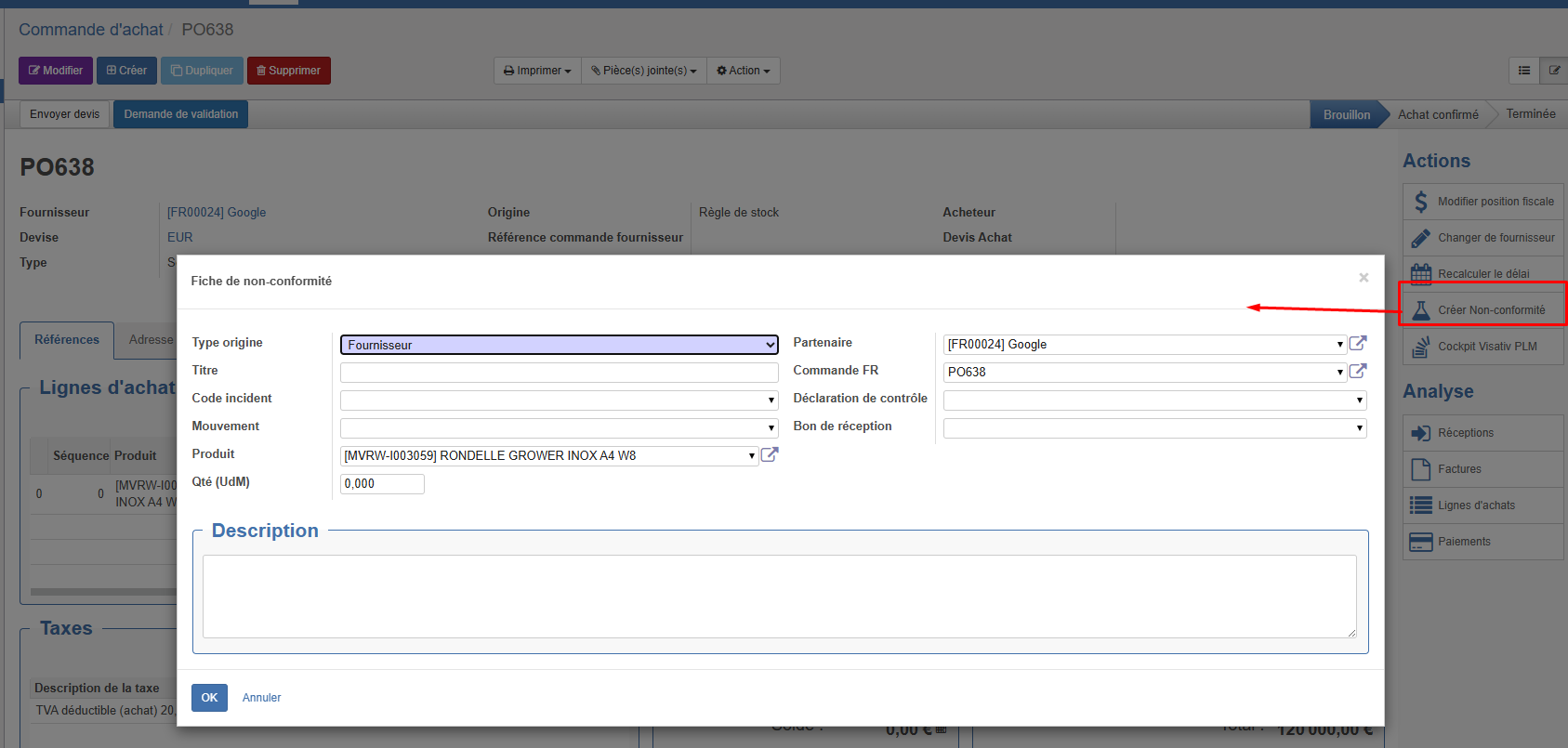
<p class="callout info">Il est maintenant possible de créer plusieurs non conformité pour un même mouvement, de déclencher une non-conformité client ou fournisseur sans la liée à un mouvement...</p>

<span style="font-family: Symbol; mso-fareast-font-family: Symbol; mso-bidi-font-family: Symbol;"><span style="mso-list: Ignore;">·<span style="font: 7.0pt 'Times New Roman';"> </span></span></span>Qualité → Client / Production / Fournisseurs → Fiche de non<span style="font-family: 'Cambria Math',serif; mso-bidi-font-family: 'Cambria Math';">‑</span>conformit<span style="mso-ascii-font-family: Calibri; mso-hansi-font-family: Calibri; mso-bidi-font-family: Calibri;">é</span>

**Origines possibles** : Contrôle qualité, Réception, Expédition, déclaration de production OF/OT, création manuelle et maintenant commande client et fournisseur.

[![image.png](https://docs.myfab.fr/uploads/images/gallery/2026-01/scaled-1680-/image.png)](https://docs.myfab.fr/uploads/images/gallery/2026-01/image.png)
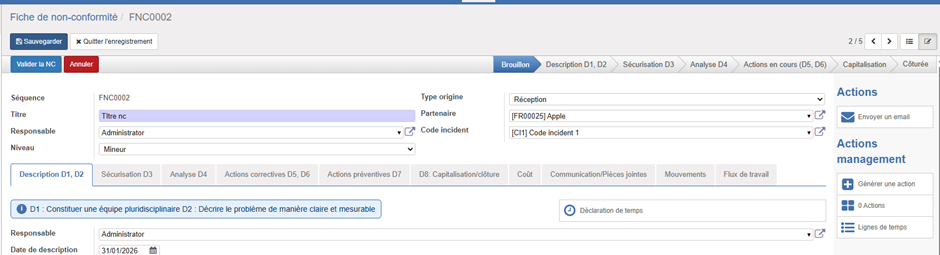
**En<span style="font-family: 'Cambria Math',serif; mso-bidi-font-family: 'Cambria Math';">‑</span>t<span style="mso-ascii-font-family: Calibri; mso-hansi-font-family: Calibri; mso-bidi-font-family: Calibri;">ê</span>te**

<span style="font-family: Symbol; mso-fareast-font-family: Symbol; mso-bidi-font-family: Symbol;"><span style="mso-list: Ignore;">·<span style="font: 7.0pt 'Times New Roman';"> </span></span></span>**Séquence** : Numéro de non-conformité

<span style="font-family: Symbol; mso-fareast-font-family: Symbol; mso-bidi-font-family: Symbol;"><span style="mso-list: Ignore;">·<span style="font: 7.0pt 'Times New Roman';"> </span></span></span>**Type origine** : Réception / Expédition / Production / Manuel

<span style="font-family: Symbol; mso-fareast-font-family: Symbol; mso-bidi-font-family: Symbol;"><span style="mso-list: Ignore;">·<span style="font: 7.0pt 'Times New Roman';"> </span></span></span>**Titre de la NC** \*: \*Résumé rapide du problème en 1 ligne

<span style="font-family: Symbol; mso-fareast-font-family: Symbol; mso-bidi-font-family: Symbol;"><span style="mso-list: Ignore;">·<span style="font: 7.0pt 'Times New Roman';"> </span></span></span>**Code incident** : Code permettant de classifier les non-conformités et d'identifier les non-conformités similaires

<span style="font-family: Symbol; mso-fareast-font-family: Symbol; mso-bidi-font-family: Symbol;"><span style="mso-list: Ignore;">·<span style="font: 7.0pt 'Times New Roman';"> </span></span></span>**Partenaire** : Client ou fournisseur

<span style="font-family: Symbol; mso-fareast-font-family: Symbol; mso-bidi-font-family: Symbol;"><span style="mso-list: Ignore;">·<span style="font: 7.0pt 'Times New Roman';"> </span></span></span>**Responsable** : Responsable générale de la non-conformité (chaque étape de non-conformité pourra avoir son propre responsable)

<span style="font-family: Symbol; mso-fareast-font-family: Symbol; mso-bidi-font-family: Symbol;"><span style="mso-list: Ignore;">·<span style="font: 7.0pt 'Times New Roman';"> </span></span></span>**Niveau** (**Criticité**) : Critique/Mineur/Majeur

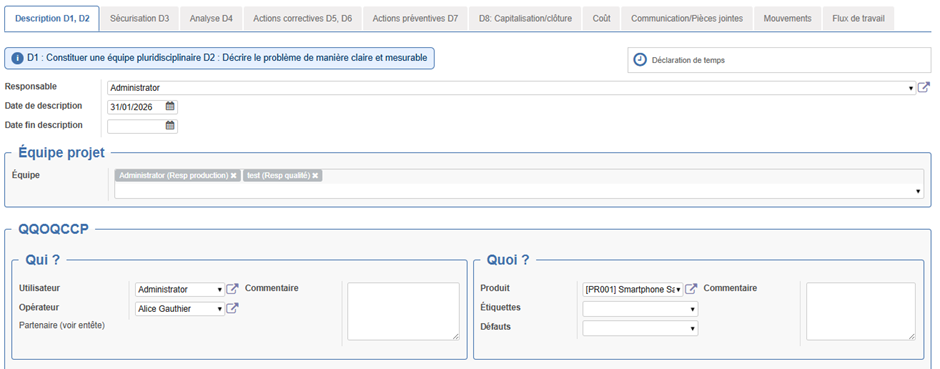
## D1–D2 – Équipe &amp; Description (QQOQCCP)

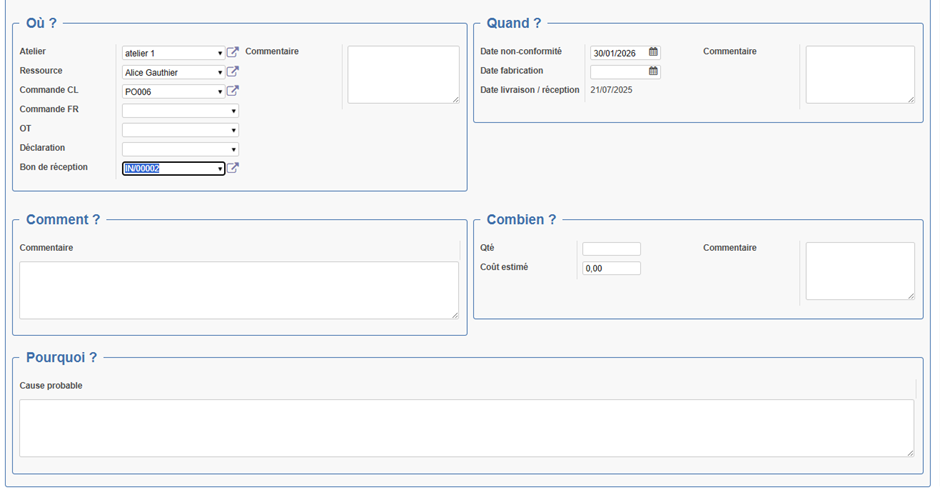
**Objectifs** : constituer l’équipe (D1) et décrire factuellement (D2).

<span style="mso-no-proof: yes;"> </span>

<span style="mso-no-proof: yes;"> </span>

[![image.png](https://docs.myfab.fr/uploads/images/gallery/2026-01/scaled-1680-/3Hyimage.png)](https://docs.myfab.fr/uploads/images/gallery/2026-01/3Hyimage.png)

[![image.png](https://docs.myfab.fr/uploads/images/gallery/2026-01/scaled-1680-/00bimage.png)](https://docs.myfab.fr/uploads/images/gallery/2026-01/00bimage.png)
**À renseigner**

<span style="font-family: Symbol; mso-fareast-font-family: Symbol; mso-bidi-font-family: Symbol;"><span style="mso-list: Ignore;">·<span style="font: 7.0pt 'Times New Roman';"> </span></span></span>**Responsable Description**

<span style="font-family: Symbol; mso-fareast-font-family: Symbol; mso-bidi-font-family: Symbol;"><span style="mso-list: Ignore;">·<span style="font: 7.0pt 'Times New Roman';"> </span></span></span>**Équipe projet** (utilisateurs + fonction)

<span style="font-family: Symbol; mso-fareast-font-family: Symbol; mso-bidi-font-family: Symbol;"><span style="mso-list: Ignore;">·<span style="font: 7.0pt 'Times New Roman';"> </span></span></span>**QQOQCCP** : Qui / Quoi / Où / Quand / Comment / Combien (qté NC + coût estimé) / Pourquoi (cause probable)

Les champs standard (date, produit, lot, étiquettes, quantité NC…) sont **intégrés** au QQOQCCP.

<span style="font-family: Symbol; mso-fareast-font-family: Symbol; mso-bidi-font-family: Symbol;"><span style="mso-list: Ignore;">·<span style="font: 7.0pt 'Times New Roman';"> </span></span></span>Date de NC = date de création (référence pour le calcul des autres dates )

<span style="font-family: 'Courier New'; mso-fareast-font-family: 'Courier New';"><span style="mso-list: Ignore;">o<span style="font: 7.0pt 'Times New Roman';"> </span></span></span>-&gt; calcul auto des dates limites D1→D8 (D1 J+1, D3 J+3, D4 J+15, D5 J+40, D7 J+60, D8 J+70)

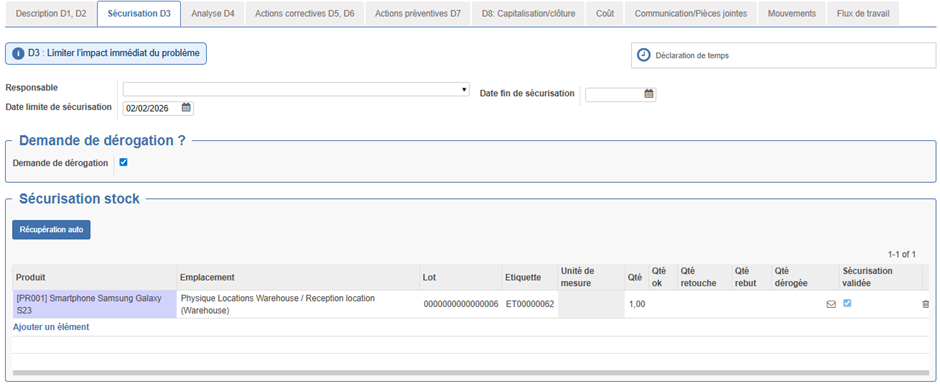
## D3 – Sécurisation immédiate

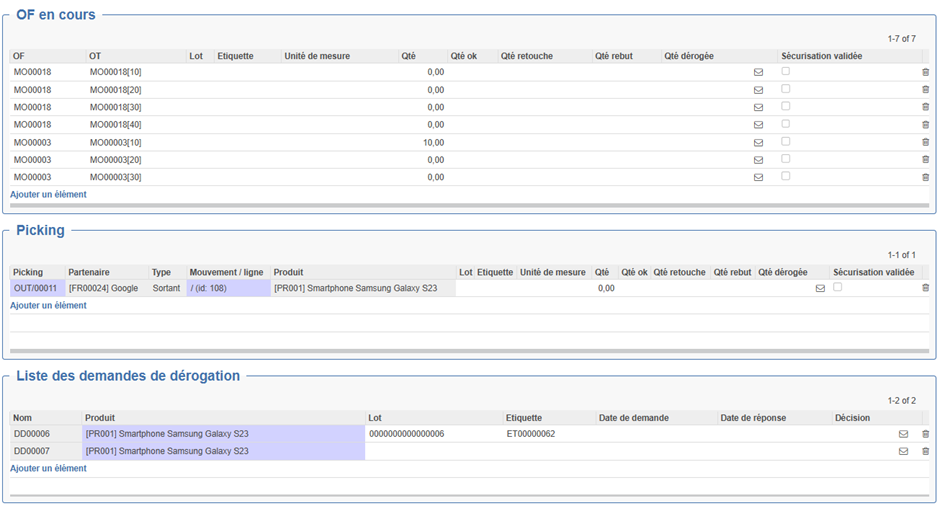
**Objectif** : limiter l’impact → stocks / OF / picking (Expédition/ Réception).

[![image.png](https://docs.myfab.fr/uploads/images/gallery/2026-01/scaled-1680-/C9Rimage.png)](https://docs.myfab.fr/uploads/images/gallery/2026-01/C9Rimage.png)
<span style="mso-no-proof: yes;"> </span>

<span style="mso-no-proof: yes;"> </span>

[![image.png](https://docs.myfab.fr/uploads/images/gallery/2026-01/scaled-1680-/Qflimage.png)](https://docs.myfab.fr/uploads/images/gallery/2026-01/Qflimage.png)

**Fonctionnalités**

<span style="font-family: Symbol; mso-fareast-font-family: Symbol; mso-bidi-font-family: Symbol;"><span style="mso-list: Ignore;">·<span style="font: 7.0pt 'Times New Roman';"> </span></span></span>**Récupération automatique** des lignes pour le produit/lot/étiquette

<span style="font-family: Symbol; mso-fareast-font-family: Symbol; mso-bidi-font-family: Symbol;"><span style="mso-list: Ignore;">·<span style="font: 7.0pt 'Times New Roman';"> </span></span></span>Ajout/modification manuel de lignes dans la sécurisation des Stocks, OF, picking

<span style="font-family: Symbol; mso-fareast-font-family: Symbol; mso-bidi-font-family: Symbol;"><span style="mso-list: Ignore;">·<span style="font: 7.0pt 'Times New Roman';"> </span></span></span>Mise à jour des états de sécurisation

<span style="font-family: Symbol; mso-fareast-font-family: Symbol; mso-bidi-font-family: Symbol;"><span style="mso-list: Ignore;">·<span style="font: 7.0pt 'Times New Roman';"> </span></span></span>**Demandes de dérogation** ligne par ligne (création rapide)

<span style="font-family: Symbol; mso-fareast-font-family: Symbol; mso-bidi-font-family: Symbol;"><span style="mso-list: Ignore;">·<span style="font: 7.0pt 'Times New Roman';"> </span></span></span>Possibilité d'envoyer un courriel sur les lignes de dérogation (Template de mail à personnaliser) et de mettre à jour la décision des demandes de dérogation (Acceptée / Refusée).

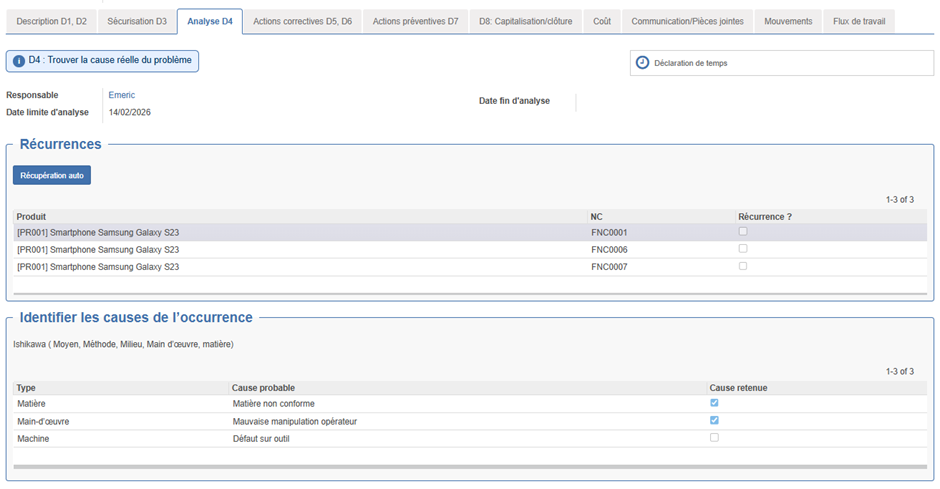
## D4 – Analyse des causes

**Objectif** : identifier causes racines et récurrences.

[![image.png](https://docs.myfab.fr/uploads/images/gallery/2026-01/scaled-1680-/0Qvimage.png)](https://docs.myfab.fr/uploads/images/gallery/2026-01/0Qvimage.png)
[![image.png](https://docs.myfab.fr/uploads/images/gallery/2026-01/scaled-1680-/ly0image.png)](https://docs.myfab.fr/uploads/images/gallery/2026-01/ly0image.png)
<span style="mso-no-proof: yes;"> </span>

<span style="mso-no-proof: yes;"> </span>

**Outils**

<span style="font-family: Symbol; mso-fareast-font-family: Symbol; mso-bidi-font-family: Symbol;"><span style="mso-list: Ignore;">·<span style="font: 7.0pt 'Times New Roman';"> </span></span></span>**Récurrences** : recherche de NC similaires (par produit / code incident)

<span style="font-family: 'Courier New'; mso-fareast-font-family: 'Courier New';"><span style="mso-list: Ignore;">o<span style="font: 7.0pt 'Times New Roman';"> </span></span></span>Récupération auto : Récupère les NC du même produit ou du même code incident

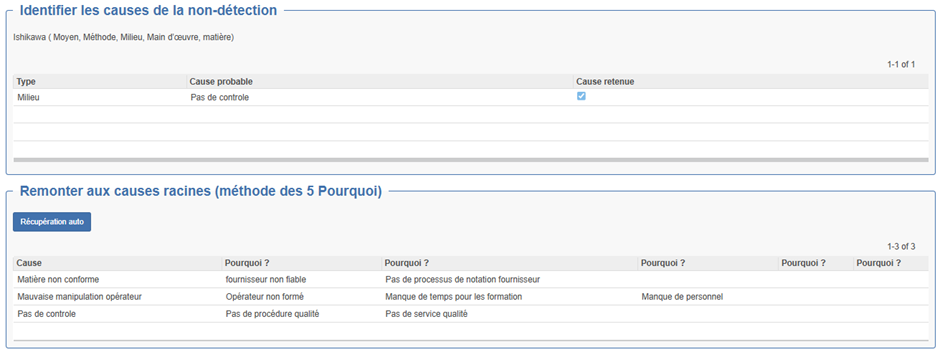
<span style="font-family: Symbol; mso-fareast-font-family: Symbol; mso-bidi-font-family: Symbol;"><span style="mso-list: Ignore;">·<span style="font: 7.0pt 'Times New Roman';"> </span></span></span>**Ishikawa (5M)** : Tableau permettant de lister les causes possibles de l'occurrence et de la non<span style="font-family: 'Cambria Math',serif; mso-bidi-font-family: 'Cambria Math';">‑</span>d<span style="mso-ascii-font-family: Calibri; mso-hansi-font-family: Calibri; mso-bidi-font-family: Calibri;">é</span>tection par rapport au 5 type (Mati<span style="mso-ascii-font-family: Calibri; mso-hansi-font-family: Calibri; mso-bidi-font-family: Calibri;">è</span>re, Moyen, Machine, Milieu, main d'œuvre;

<span style="font-family: Symbol; mso-fareast-font-family: Symbol; mso-bidi-font-family: Symbol;"><span style="mso-list: Ignore;">·<span style="font: 7.0pt 'Times New Roman';"> </span></span></span>**5 Pourquoi** : généré automatiquement depuis les **causes retenues**

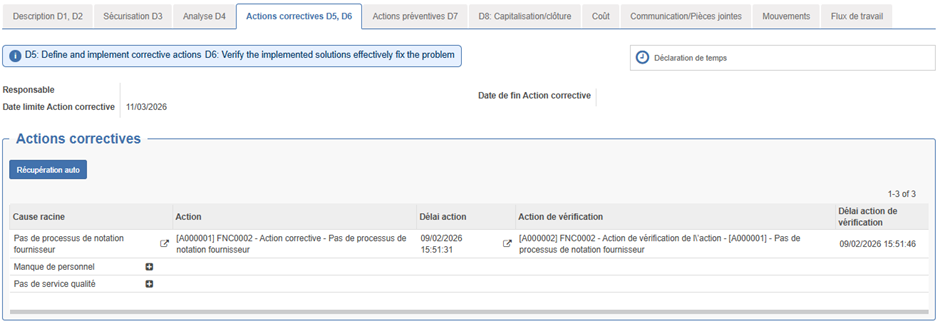
## D5 – D6 Actions Correctives et Vérification

**Objectif** : supprimer la cause racine et **prouver l’efficacité**.

[![image.png](https://docs.myfab.fr/uploads/images/gallery/2026-01/scaled-1680-/noyimage.png)](https://docs.myfab.fr/uploads/images/gallery/2026-01/noyimage.png)
<span style="mso-no-proof: yes;"> </span>

**Fonctionnement**

<span style="font-family: Symbol; mso-fareast-font-family: Symbol; mso-bidi-font-family: Symbol;"><span style="mso-list: Ignore;">·<span style="font: 7.0pt 'Times New Roman';"> </span></span></span>**Bouton Récupération auto** : récupère les causes racines depuis D4

<span style="font-family: Symbol; mso-fareast-font-family: Symbol; mso-bidi-font-family: Symbol;"><span style="mso-list: Ignore;">·<span style="font: 7.0pt 'Times New Roman';"> </span></span></span>Pour chaque **cause** on peut créer une action **Créer action corrective** et **une action de vérification** à partir d'une action Template à créer. (Retrouver les Template d'action depuis Bureau&gt;action&gt; Actions modèles)

<span style="font-family: 'Courier New'; mso-fareast-font-family: 'Courier New';"><span style="mso-list: Ignore;">o<span style="font: 7.0pt 'Times New Roman';"> </span></span></span>Sur l'action, onglet Configuration : case **« est modèle »** et « **délai »** pour calculer la date de l'action

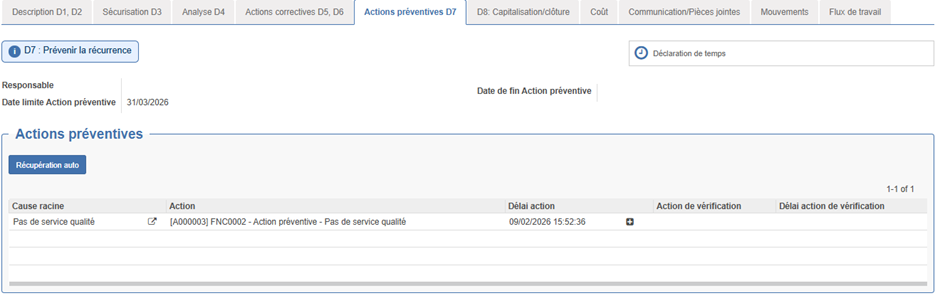
## D7 – Actions Préventives

**Objectif** : éviter la réapparition.

[![image.png](https://docs.myfab.fr/uploads/images/gallery/2026-01/scaled-1680-/jZFimage.png)](https://docs.myfab.fr/uploads/images/gallery/2026-01/jZFimage.png)
<span style="mso-no-proof: yes;"> </span>

**Fonctionnement** : identique aux correctives (création + vérification associée).

## D8 – Clôture &amp; Capitalisation

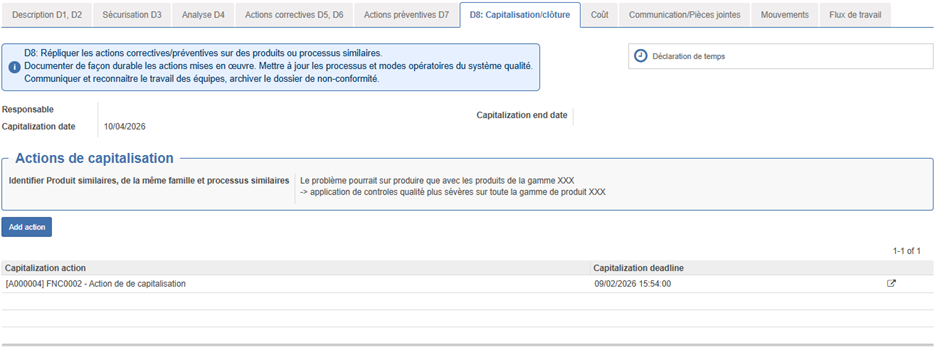
Répliquer les actions correctives/préventives sur des produits ou processus similaires. Documenter de façon durable les actions mises en œuvre. Mettre à jour les processus et modes opératoires du système qualité. Communiquer et reconnaitre le travail des équipes, archiver le dossier de non-conformité.

[![image.png](https://docs.myfab.fr/uploads/images/gallery/2026-01/scaled-1680-/VXaimage.png)](https://docs.myfab.fr/uploads/images/gallery/2026-01/VXaimage.png)
<span style="mso-no-proof: yes;"> </span>

<span style="font-family: Symbol; mso-fareast-font-family: Symbol; mso-bidi-font-family: Symbol;"><span style="mso-list: Ignore;">·<span style="font: 7.0pt 'Times New Roman';"> </span></span></span>**Responsable Clôture** (prérempli via paramètres)

<span style="font-family: Symbol; mso-fareast-font-family: Symbol; mso-bidi-font-family: Symbol;"><span style="mso-list: Ignore;">·<span style="font: 7.0pt 'Times New Roman';"> </span></span></span>**Actions de capitalisation** (sur le même fonctionnement que les actions correctives et préventives)

<span style="font-family: Symbol; mso-fareast-font-family: Symbol; mso-bidi-font-family: Symbol;"><span style="mso-list: Ignore;">·<span style="font: 7.0pt 'Times New Roman';"> </span></span></span>**Produits / processus similaires** (champ texte)

<span style="font-family: Symbol; mso-fareast-font-family: Symbol; mso-bidi-font-family: Symbol;"><span style="mso-list: Ignore;">·<span style="font: 7.0pt 'Times New Roman';"> </span></span></span>**Onglet Communication** : envoi du mail final (Template)

<span style="font-family: Symbol; mso-fareast-font-family: Symbol; mso-bidi-font-family: Symbol;"><span style="mso-list: Ignore;">·<span style="font: 7.0pt 'Times New Roman';"> </span></span></span>**Conditions** pour clôturer : toutes les étapes **D1 → D7** doivent avoir une **date de fin**.

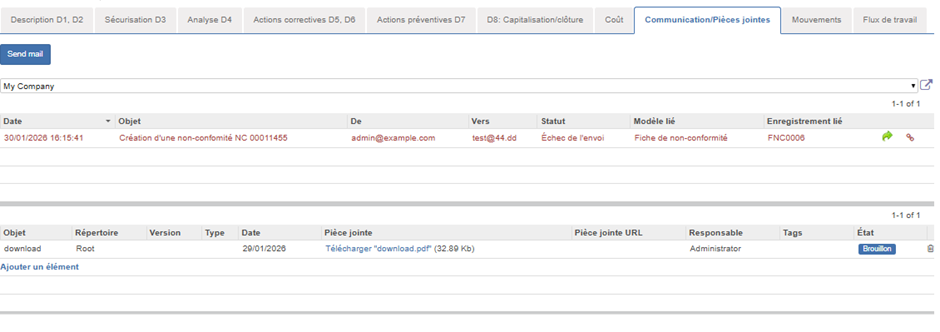
## Onglet Communication / pièces jointes

[![image.png](https://docs.myfab.fr/uploads/images/gallery/2026-01/scaled-1680-/Ytximage.png)](https://docs.myfab.fr/uploads/images/gallery/2026-01/Ytximage.png)
<span style="mso-no-proof: yes;"> </span>

<span style="font-family: Symbol; mso-fareast-font-family: Symbol; mso-bidi-font-family: Symbol;"><span style="mso-list: Ignore;">·<span style="font: 7.0pt 'Times New Roman';"> </span></span></span>**Bouton** **Envoyer mail** (choix du Template) : vous pouvez créer plusieurs Template de mail en fonction des communications que vous souhaitez faire au partenaire ou interne.

<span style="font-family: Symbol; mso-fareast-font-family: Symbol; mso-bidi-font-family: Symbol;"><span style="mso-list: Ignore;">·<span style="font: 7.0pt 'Times New Roman';"> </span></span></span>Historique des mail associés à la non-conformité

<span style="font-family: Symbol; mso-fareast-font-family: Symbol; mso-bidi-font-family: Symbol;"><span style="mso-list: Ignore;">·<span style="font: 7.0pt 'Times New Roman';"> </span></span></span>Pièces jointes

## Onglet Mouvements de stock

<span style="font-family: Symbol; mso-fareast-font-family: Symbol; mso-bidi-font-family: Symbol;"><span style="mso-list: Ignore;">·<span style="font: 7.0pt 'Times New Roman';"> </span></span></span>Lignes de **retour** / **re<span style="font-family: 'Cambria Math',serif; mso-bidi-font-family: 'Cambria Math';">‑</span>retour** / **mouvements liés**

## Onglet Coûts

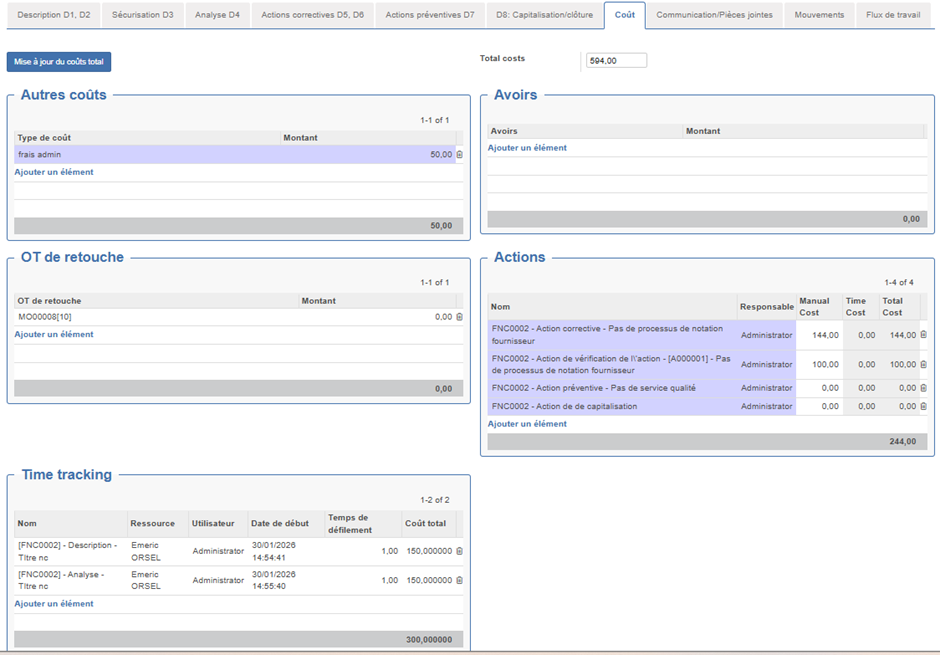
Permet de visualiser tous les coûts engendrés par la non-conformité

[![image.png](https://docs.myfab.fr/uploads/images/gallery/2026-01/scaled-1680-/fg4image.png)](https://docs.myfab.fr/uploads/images/gallery/2026-01/fg4image.png)
<span style="mso-no-proof: yes;"> </span>

**Autres coûts** : Coût manuelles par type

**Avoir** : Avoirs associés à la non-conformité

**OT de retouches** : Liste des OT de retouches (associées automatiquement crée via bouton OT de retouche) sinon peut être associé manuellement

**Actions** : Liste des actions associées à la non-conformité

Pour chaque action on récupère le cout des lignes de temps associé ou/et mettre un coût manuel

**Lignes de temps :** Récupère et valorise les lignes associées à la non-conformité (temps déclarés depuis chaque onglet) valorisé au taux de la ressource

**Remarque** : il peut être utile d'associer une ressource à chaque fiche utilisateur pour simplifier la déclaration de temps.

**Coûts Total** : cout total de la non-conformité (manuel ou récupéré automatiquement via bouton « Mettre à jour les couts »

**Bouton** **Mettre à jour le coût total** : recalcule la somme de tous les couts dans « Coûts total » et met à jour le prix de revient des OT de retouche

# Actions complémentaires

[![image.png](https://docs.myfab.fr/uploads/images/gallery/2026-01/scaled-1680-/Gltimage.png)](https://docs.myfab.fr/uploads/images/gallery/2026-01/Gltimage.png)
<span style="mso-no-proof: yes;"> </span>

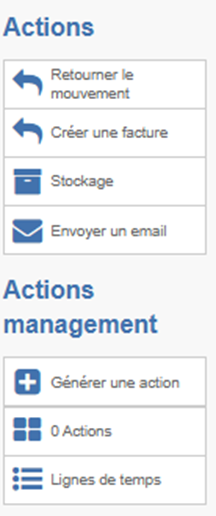
<span style="font-family: Symbol; mso-fareast-font-family: Symbol; mso-bidi-font-family: Symbol;"><span style="mso-list: Ignore;">·<span style="font: 7.0pt 'Times New Roman';"> </span></span></span>**Retourner produit** (si picking lié)

<span style="font-family: Symbol; mso-fareast-font-family: Symbol; mso-bidi-font-family: Symbol;"><span style="mso-list: Ignore;">·<span style="font: 7.0pt 'Times New Roman';"> </span></span></span>**Créer facture / avoir** (si FNC partenaire)

<span style="font-family: Symbol; mso-fareast-font-family: Symbol; mso-bidi-font-family: Symbol;"><span style="mso-list: Ignore;">·<span style="font: 7.0pt 'Times New Roman';"> </span></span></span>**Rangement** (déplacement vers emplacement cible)

<span style="font-family: Symbol; mso-fareast-font-family: Symbol; mso-bidi-font-family: Symbol;"><span style="mso-list: Ignore;">·<span style="font: 7.0pt 'Times New Roman';"> </span></span></span>**Retoucher l’OT** (déclare une opération de retouche si OT liée)

<span style="font-family: Symbol; mso-fareast-font-family: Symbol; mso-bidi-font-family: Symbol;"><span style="mso-list: Ignore;">·<span style="font: 7.0pt 'Times New Roman';"> </span></span></span>**Actions :** permet de visualiser la liste des actions liées à la non-conformité

<span style="font-family: Symbol; mso-fareast-font-family: Symbol; mso-bidi-font-family: Symbol;"><span style="mso-list: Ignore;">·<span style="font: 7.0pt 'Times New Roman';"> </span></span></span>**Lignes de temps :** Visualiser les lignes de temps associées à la non-conformité

# Bonnes pratiques

<span style="font-family: Symbol; mso-fareast-font-family: Symbol; mso-bidi-font-family: Symbol;"><span style="mso-list: Ignore;">·<span style="font: 7.0pt 'Times New Roman';"> </span></span></span>**Décrire tôt et factuel** (QQOQCCP) pour accélérer D4–D6

<span style="font-family: Symbol; mso-fareast-font-family: Symbol; mso-bidi-font-family: Symbol;"><span style="mso-list: Ignore;">·<span style="font: 7.0pt 'Times New Roman';"> </span></span></span>**Sécuriser avant d’analyser** (D3 → D4)

<span style="font-family: Symbol; mso-fareast-font-family: Symbol; mso-bidi-font-family: Symbol;"><span style="mso-list: Ignore;">·<span style="font: 7.0pt 'Times New Roman';"> </span></span></span>**Toujours associer une vérification** à chaque action corrective/préventive

<span style="font-family: Symbol; mso-fareast-font-family: Symbol; mso-bidi-font-family: Symbol;"><span style="mso-list: Ignore;">·<span style="font: 7.0pt 'Times New Roman';"> </span></span></span>**Mettre à jour les coûts** après les retouches et temps pointés

<span style="font-family: Symbol; mso-fareast-font-family: Symbol; mso-bidi-font-family: Symbol;"><span style="mso-list: Ignore;">·<span style="font: 7.0pt 'Times New Roman';"> </span></span></span>**Clôturer** uniquement quand toutes les **dates de fin** D1→D7 sont renseignées

# Standard vs Avancé — Vue d’ensemble

<table border="1" cellpadding="0" cellspacing="0" class="MsoTable15Grid4Accent1" id="bkmrk-%C3%89l%C3%A9ment-standard-ope" style="border-collapse: collapse; border: none; mso-border-alt: solid windowtext .5pt; mso-yfti-tbllook: 1184; mso-padding-alt: 0cm 5.4pt 0cm 5.4pt; mso-border-insideh: .5pt solid windowtext; mso-border-insidev: .5pt solid windowtext;"><tbody><tr style="mso-yfti-irow: -1; mso-yfti-firstrow: yes; mso-yfti-lastfirstrow: yes;"><td style="border: solid #5B9BD5 1.0pt; mso-border-themecolor: accent1; border-right: none; mso-border-top-alt: solid #5B9BD5 .5pt; mso-border-top-themecolor: accent1; mso-border-left-alt: solid #5B9BD5 .5pt; mso-border-left-themecolor: accent1; mso-border-bottom-alt: solid #5B9BD5 .5pt; mso-border-bottom-themecolor: accent1; background: #5B9BD5; mso-background-themecolor: accent1; padding: 0cm 5.4pt 0cm 5.4pt;">**<span style="color: white; mso-themecolor: background1;">Élément</span>**

</td><td style="border-top: solid #5B9BD5 1.0pt; mso-border-top-themecolor: accent1; border-left: none; border-bottom: solid #5B9BD5 1.0pt; mso-border-bottom-themecolor: accent1; border-right: none; mso-border-top-alt: solid #5B9BD5 .5pt; mso-border-bottom-alt: solid #5B9BD5 .5pt; background: #5B9BD5; mso-background-themecolor: accent1; padding: 0cm 5.4pt 0cm 5.4pt;">**<span style="color: white; mso-themecolor: background1;">Standard Open</span><span style="font-family: 'Cambria Math',serif; mso-bidi-font-family: 'Cambria Math'; color: white; mso-themecolor: background1;">‑</span><span style="color: white; mso-themecolor: background1;">Prod</span>**

</td><td style="border: solid #5B9BD5 1.0pt; mso-border-themecolor: accent1; border-left: none; mso-border-top-alt: solid #5B9BD5 .5pt; mso-border-top-themecolor: accent1; mso-border-bottom-alt: solid #5B9BD5 .5pt; mso-border-bottom-themecolor: accent1; mso-border-right-alt: solid #5B9BD5 .5pt; mso-border-right-themecolor: accent1; background: #5B9BD5; mso-background-themecolor: accent1; padding: 0cm 5.4pt 0cm 5.4pt;">**<span style="color: white; mso-themecolor: background1;">Module NC Avancée (8D)</span>**

</td></tr><tr style="mso-yfti-irow: 0;"><td style="border: solid windowtext 1.0pt; border-top: none; mso-border-top-alt: solid windowtext .5pt; mso-border-alt: solid windowtext .5pt; background: #DEEAF6; mso-background-themecolor: accent1; mso-background-themetint: 51; padding: 0cm 5.4pt 0cm 5.4pt;">**<span style="color: black; mso-color-alt: windowtext;">Workflow</span>**

</td><td style="border-top: none; border-left: none; border-bottom: solid windowtext 1.0pt; border-right: solid windowtext 1.0pt; mso-border-top-alt: solid windowtext .5pt; mso-border-left-alt: solid windowtext .5pt; mso-border-alt: solid windowtext .5pt; background: #DEEAF6; mso-background-themecolor: accent1; mso-background-themetint: 51; padding: 0cm 5.4pt 0cm 5.4pt;"><span style="color: black; mso-color-alt: windowtext;">Brouillon → En cours → Terminé</span>

</td><td style="border-top: none; border-left: none; border-bottom: solid windowtext 1.0pt; border-right: solid windowtext 1.0pt; mso-border-top-alt: solid windowtext .5pt; mso-border-left-alt: solid windowtext .5pt; mso-border-alt: solid windowtext .5pt; background: #DEEAF6; mso-background-themecolor: accent1; mso-background-themetint: 51; padding: 0cm 5.4pt 0cm 5.4pt;"><span style="color: black; mso-color-alt: windowtext;">Brouillon → D1/D2 → D3 → D4 → D5/D6 → D7 → D8 → Cloturée</span>

</td></tr><tr style="mso-yfti-irow: 1;"><td style="border: solid windowtext 1.0pt; border-top: none; mso-border-top-alt: solid windowtext .5pt; mso-border-alt: solid windowtext .5pt; padding: 0cm 5.4pt 0cm 5.4pt;">**Analyse**

</td><td style="border-top: none; border-left: none; border-bottom: solid windowtext 1.0pt; border-right: solid windowtext 1.0pt; mso-border-top-alt: solid windowtext .5pt; mso-border-left-alt: solid windowtext .5pt; mso-border-alt: solid windowtext .5pt; padding: 0cm 5.4pt 0cm 5.4pt;">Description + pièces jointes

</td><td style="border-top: none; border-left: none; border-bottom: solid windowtext 1.0pt; border-right: solid windowtext 1.0pt; mso-border-top-alt: solid windowtext .5pt; mso-border-left-alt: solid windowtext .5pt; mso-border-alt: solid windowtext .5pt; padding: 0cm 5.4pt 0cm 5.4pt;">QQOQCCP, Ishikawa, 5 Pourquoi, récurrences

</td></tr><tr style="mso-yfti-irow: 2;"><td style="border: solid windowtext 1.0pt; border-top: none; mso-border-top-alt: solid windowtext .5pt; mso-border-alt: solid windowtext .5pt; background: #DEEAF6; mso-background-themecolor: accent1; mso-background-themetint: 51; padding: 0cm 5.4pt 0cm 5.4pt;">**<span style="color: black; mso-color-alt: windowtext;">Actions</span>**

</td><td style="border-top: none; border-left: none; border-bottom: solid windowtext 1.0pt; border-right: solid windowtext 1.0pt; mso-border-top-alt: solid windowtext .5pt; mso-border-left-alt: solid windowtext .5pt; mso-border-alt: solid windowtext .5pt; background: #DEEAF6; mso-background-themecolor: accent1; mso-background-themetint: 51; padding: 0cm 5.4pt 0cm 5.4pt;"><span style="color: black; mso-color-alt: windowtext;">Liste simple</span>

</td><td style="border-top: none; border-left: none; border-bottom: solid windowtext 1.0pt; border-right: solid windowtext 1.0pt; mso-border-top-alt: solid windowtext .5pt; mso-border-left-alt: solid windowtext .5pt; mso-border-alt: solid windowtext .5pt; background: #DEEAF6; mso-background-themecolor: accent1; mso-background-themetint: 51; padding: 0cm 5.4pt 0cm 5.4pt;"><span style="color: black; mso-color-alt: windowtext;">Correctives, Préventives, Vérification, Capitalisation</span>

</td></tr><tr style="mso-yfti-irow: 3;"><td style="border: solid windowtext 1.0pt; border-top: none; mso-border-top-alt: solid windowtext .5pt; mso-border-alt: solid windowtext .5pt; padding: 0cm 5.4pt 0cm 5.4pt;">**Coûts**

</td><td style="border-top: none; border-left: none; border-bottom: solid windowtext 1.0pt; border-right: solid windowtext 1.0pt; mso-border-top-alt: solid windowtext .5pt; mso-border-left-alt: solid windowtext .5pt; mso-border-alt: solid windowtext .5pt; padding: 0cm 5.4pt 0cm 5.4pt;">Autres coûts, Avoirs, OT retouche

</td><td style="border-top: none; border-left: none; border-bottom: solid windowtext 1.0pt; border-right: solid windowtext 1.0pt; mso-border-top-alt: solid windowtext .5pt; mso-border-left-alt: solid windowtext .5pt; mso-border-alt: solid windowtext .5pt; padding: 0cm 5.4pt 0cm 5.4pt;">Autres coûts, Avoirs, OT retouche, Coûts actions, Temps pointés, Total auto

</td></tr><tr style="mso-yfti-irow: 4;"><td style="border: solid windowtext 1.0pt; border-top: none; mso-border-top-alt: solid windowtext .5pt; mso-border-alt: solid windowtext .5pt; background: #DEEAF6; mso-background-themecolor: accent1; mso-background-themetint: 51; padding: 0cm 5.4pt 0cm 5.4pt;">**<span style="color: black; mso-color-alt: windowtext;">Communication</span>**

</td><td style="border-top: none; border-left: none; border-bottom: solid windowtext 1.0pt; border-right: solid windowtext 1.0pt; mso-border-top-alt: solid windowtext .5pt; mso-border-left-alt: solid windowtext .5pt; mso-border-alt: solid windowtext .5pt; background: #DEEAF6; mso-background-themecolor: accent1; mso-background-themetint: 51; padding: 0cm 5.4pt 0cm 5.4pt;"><span style="color: black; mso-color-alt: windowtext;">Emails</span>

</td><td style="border-top: none; border-left: none; border-bottom: solid windowtext 1.0pt; border-right: solid windowtext 1.0pt; mso-border-top-alt: solid windowtext .5pt; mso-border-left-alt: solid windowtext .5pt; mso-border-alt: solid windowtext .5pt; background: #DEEAF6; mso-background-themecolor: accent1; mso-background-themetint: 51; padding: 0cm 5.4pt 0cm 5.4pt;"><span style="color: black; mso-color-alt: windowtext;">- Templates, envois contextuels</span>

</td></tr><tr style="mso-yfti-irow: 5;"><td style="border: solid windowtext 1.0pt; border-top: none; mso-border-top-alt: solid windowtext .5pt; mso-border-alt: solid windowtext .5pt; padding: 0cm 5.4pt 0cm 5.4pt;">**Dérogations**

</td><td style="border-top: none; border-left: none; border-bottom: solid windowtext 1.0pt; border-right: solid windowtext 1.0pt; mso-border-top-alt: solid windowtext .5pt; mso-border-left-alt: solid windowtext .5pt; mso-border-alt: solid windowtext .5pt; padding: 0cm 5.4pt 0cm 5.4pt;">Non géré

</td><td style="border-top: none; border-left: none; border-bottom: solid windowtext 1.0pt; border-right: solid windowtext 1.0pt; mso-border-top-alt: solid windowtext .5pt; mso-border-left-alt: solid windowtext .5pt; mso-border-alt: solid windowtext .5pt; padding: 0cm 5.4pt 0cm 5.4pt;">Demandes de dérogation par ligne de sécurisation

</td></tr><tr style="mso-yfti-irow: 6;"><td style="border: solid windowtext 1.0pt; border-top: none; mso-border-top-alt: solid windowtext .5pt; mso-border-alt: solid windowtext .5pt; background: #DEEAF6; mso-background-themecolor: accent1; mso-background-themetint: 51; padding: 0cm 5.4pt 0cm 5.4pt;">**<span style="color: black; mso-color-alt: windowtext;">Temps</span>**

</td><td style="border-top: none; border-left: none; border-bottom: solid windowtext 1.0pt; border-right: solid windowtext 1.0pt; mso-border-top-alt: solid windowtext .5pt; mso-border-left-alt: solid windowtext .5pt; mso-border-alt: solid windowtext .5pt; background: #DEEAF6; mso-background-themecolor: accent1; mso-background-themetint: 51; padding: 0cm 5.4pt 0cm 5.4pt;"><span style="color: black; mso-color-alt: windowtext;">Non intégré</span>

</td><td style="border-top: none; border-left: none; border-bottom: solid windowtext 1.0pt; border-right: solid windowtext 1.0pt; mso-border-top-alt: solid windowtext .5pt; mso-border-left-alt: solid windowtext .5pt; mso-border-alt: solid windowtext .5pt; background: #DEEAF6; mso-background-themecolor: accent1; mso-background-themetint: 51; padding: 0cm 5.4pt 0cm 5.4pt;"><span style="color: black; mso-color-alt: windowtext;">Déclarations de temps intégrées</span>

</td></tr><tr style="mso-yfti-irow: 7; mso-yfti-lastrow: yes;"><td style="border: solid windowtext 1.0pt; border-top: none; mso-border-top-alt: solid windowtext .5pt; mso-border-alt: solid windowtext .5pt; padding: 0cm 5.4pt 0cm 5.4pt;">**Sécurisation**

</td><td style="border-top: none; border-left: none; border-bottom: solid windowtext 1.0pt; border-right: solid windowtext 1.0pt; mso-border-top-alt: solid windowtext .5pt; mso-border-left-alt: solid windowtext .5pt; mso-border-alt: solid windowtext .5pt; padding: 0cm 5.4pt 0cm 5.4pt;">Non géré

</td><td style="border-top: none; border-left: none; border-bottom: solid windowtext 1.0pt; border-right: solid windowtext 1.0pt; mso-border-top-alt: solid windowtext .5pt; mso-border-left-alt: solid windowtext .5pt; mso-border-alt: solid windowtext .5pt; padding: 0cm 5.4pt 0cm 5.4pt;">Stocks / OF / Pickings / dérogations / récup. auto

</td></tr></tbody></table>